Last checked
Native LMS hubSilent Student, a Canvas answer bot and quiz bot for Mac and Windows
Silent Student is a desktop app for Mac and Windows, made by El Dorado Ignition LLC, that works your Canvas quizzes, essays, discussion posts and file uploads in due-date order and holds written work for your approval. Plans start at $11.99 a month.
Is there an app that completes Canvas assignments?
Yes. Silent Student is a desktop app for Mac and Windows, made by El Dorado Ignition LLC, that signs in to your Canvas in its own browser and works your quizzes (Classic and New Quizzes), essays, discussion posts and file uploads in due-date order. Written work waits for your approval. It does not take proctored or LockDown Browser quizzes. Plans start at $11.99 a month.
| What it works in Canvas | Quizzes, essays, discussion posts and file uploads, in due-date order. |
|---|---|
| Quiz question types | Most Classic Quiz types; see the table below. Not calculated or in-quiz file-upload questions. |
| Courseware Canvas opens | Opened from Canvas links: WebAssign, Cengage, Connect, SmartBook, MyLab, Macmillan Achieve, ALEKS, Packback, Savvas Realize. |
| How it signs in | Direct login, SSO (Okta, ClassLink, Clever) or CAS, with MFA once at setup. Credentials stay on your computer, encrypted by the OS. |
| What waits for you | Essays, discussions and uploads, always; some graded single-attempt quizzes; any answer below 70% confidence. |
| What it will not do | Proctored or LockDown Browser quizzes, or submit a quiz less than half answered. |
| Plan | All three plans include Canvas: Base $11.99, Plus $24.99, Pro $49.99 a month. No free plan. Pricing |
| Runs on | Mac with Apple Silicon, macOS 13+ (Intel by request for members), or 64-bit Windows 10+. Public beta: Mac build not notarized, Windows build unsigned. Download |
| Measured accuracy | No Canvas-quiz replica yet. On 7 publisher-site replicas: 95% of graded answers (156 of 164), scored September 22, 2026. Benchmark method |
| How it differs from a Canvas quiz extension | An extension, such as Canvas Quiz Solver, shows answers in your tab; Silent Student is a separate app that answers and submits, or holds work for you. Canvas quiz extensions compared |
| Instructure’s Acceptable Use | Bars access “by any means other than our publicly supported interfaces” and sharing your login with a third party. Read the policy |
| Last checked | October 20, 2026 |
Is there a Canvas answer bot or quiz bot?
Yes, of two kinds. Most Canvas answer bots are browser extensions that work on the quiz page while you click. Canvas Quiz Solver shows an answer under a question when you click its icon, SnapGPT reads a screenshot and says “It never submits anything,” and Answerly AI fills answers in, with “Solve All” for a whole page. None of the three says it submits the quiz. Silent Student is the other kind: a desktop quiz bot for Mac and Windows that opens the quiz in its own browser, answers each question and submits it, or holds it for you. It does not take proctored or LockDown Browser quizzes.
Sources: Canvas Quiz Solver, home page; SnapGPT, Canvas page; Answerly AI, home page, checked October 20, 2026.
Which Canvas question types does Silent Student handle?
| Question type | Handled | Notes |
|---|---|---|
| Classic Quizzes | Yes | Most question types; not calculated or in-quiz file-upload questions. |
| Online text-entry essays | Yes, held | Held for your approval. |
| File uploads | Yes, held | Held for your approval. |
| Discussions | Yes, held | Held for your approval. |
| External-tool links | Yes | Each platform has its own page. |
| Proctored or LockDown Browser quizzes | No | Left for you to take. |
What it will not do on Canvas
- It will not submit your writing unasked. Essays, discussion posts and file uploads are always drafted and held. Nothing goes in under your name until you approve it. Canvas has no unsubmit button, so that check comes first.
- Some quizzes stop short on purpose. A graded, single-attempt, untimed quiz more than 20 minutes from its deadline is held for review, as is any quiz with an answer below 70% confidence. If your quiz is timed, see what happens when a Canvas quiz time limit runs out.
- Some question types aren’t supported. Calculated questions get only a generic text attempt; in-quiz file-upload and hotspot questions are left unanswered. Check those yourself.
- It refuses to submit a half-answered quiz. If fewer than half the questions got an answer, the attempt is left open for you rather than turned in short.
How much does Silent Student cost for Canvas?
Every plan includes Canvas, billed monthly. There is no free plan, and no free trial for general signups; a money-back guarantee applies if a problem on our side can’t be fixed within 3 days (request within 30 days, before you cancel; conditions apply).
| Plan | Price | Includes |
|---|---|---|
| Base | $11.99 a month | 1× monthly usage pool |
| Plus | $24.99 a month | 2× usage and the advanced pro model |
| Pro | $49.99 a month | Unlimited usage (fair use) and the pro model |
See Silent Student pricing and plans and the guarantee.
Does it work on proctored Canvas exams?
No. Quizzes behind Respondus LockDown Browser, Proctorio or Honorlock are recognized and left alone, not attempted. Take those yourself.
Silent Student vs other tools for Canvas
Canvas answer bots and quiz extensions compared by who enters the answer and who submits. FastSolve, Apex Vision AI and more Canvas tools are on our Best AI for Canvas page. Solvely’s prices are from its pricing page at solvely.ai, checked October 20, 2026.
| Tool | What it is | Who enters answers | Submits? | Price |
|---|---|---|---|---|
| Silent Student (ours) | Desktop app for Mac and Windows | Silent Student, in its own browser | Yes; essays, discussions and uploads wait for your approval | $11.99, $24.99 or $49.99 a month; no free plan |
| Canvas Quiz Solver | Chrome extension | You click; the answer appears on the quiz page | Not described | Limited free answers; $14.99 a month |
| SnapGPT | Chrome and Firefox extension | You, from a screenshot | “It never submits anything” | Free 5 answers a day; Plus $9.99 a month |
| Solvely | Chrome extension and phone apps; answers from a screenshot | You, from a screenshot | Not described | Free plan with 2 solves; Pro $8.99 a week after a $3.99 first week |
| Answerly AI | Chrome and Firefox extension. It advertises that it can’t be detected; we haven’t tested that, and Silent Student makes no such claim | It fills answers in; “Solve All” does the whole page | Not described | $12.99 a month; 150 Quiz Solver uses a day |
We make Silent Student. Other rows quote their own pages, checked October 20, 2026: Canvas Quiz Solver, SnapGPT, Solvely, Answerly AI.
Guides for Canvas
- What happens when a Canvas quiz time limit runs out?Canvas auto-submits, the timer keeps running if you leave, and the Until date beats the time limit, in Classic and New Quizzes.
- How to see your Canvas quiz answers after you submit
- How to finish Canvas assignments faster
- Canvas GPA calculator: turn Canvas course grades into a GPA
- How do What-If grades work in Canvas?Type a pretend score and Canvas recalculates your grade. Who can see it, current vs total grade, weighted groups, and why the iPhone app may not show it.
- Why is my Canvas total grade hidden?“Calculation of totals has been disabled” means your instructor hid totals. What you can still see, the other settings that hide grades, and how to rebuild your grade.
- Can you unsubmit an assignment on Canvas?No. Instructure says a submitted file can’t be deleted, and instructors need an administrator to remove a submission. What to do after a wrong submission (New Attempt, a comment, your instructor) and what your instructor still sees.
- What happens when you resubmit an assignment on Canvas?Your new attempt becomes the one you see, and your instructor can open every earlier one in SpeedGrader. How to resubmit, why New Attempt is missing or disabled, late labels and whether teachers get notified.
- How does the Canvas late penalty work?Points off per day or per hour, partial days rounded up, the lowest-grade floor, what the Late label means, late resubmissions, and when you can still submit.
- How do you see missing assignments on Canvas?The List View Dashboard and Alert menu show missing work from every course, and the Grades page shows it in the Status column. What Missing means, why a Missing item can already have a score, and when it turns Late.
- What does Excused mean on Canvas?EX is a status your instructor sets. You can’t submit the assignment and it is left out of your total. How EX differs from a 0, a dash and Missing, with a worked example.
- What can teachers see on Canvas?Last activity, an estimate of time in the course, every page and file you opened, weekly page views and each submission’s time, quoted from Instructure’s instructor guides. Also what teachers can’t see.
- What do Canvas, McGraw Hill, Pearson, Cengage and IXL say about AI tools?The exact Terms clauses on bots, AI agents, browser extensions and login sharing for every platform we cover, with section, date and source, plus what McGraw Hill, IXL and Pearson changed in 2026.
What does Silent Student do on Canvas?
The four native Canvas assignment types. Written work is always held for your approval.
Canvas quizzes
Read question by question and answered, with each attempt and score recorded.
Essays and text entry
Outlined, drafted and reviewed, then held for your approval before anything is submitted.
Discussion posts
A reply drafted to the prompt and held until you approve it.
File-upload assignments
Handled in the same loop as everything else, and held for approval.
The gateway to courseware
WebAssign, Cengage, Packback and SmartBook open from their Canvas links.
Course and due-date sync
Each sync pulls your courses fresh and puts the most urgent work first.
How does Silent Student work on Canvas, step by step?
Connect Canvas once
Sign in the way your school expects: direct login, SSO, or by hand.
It syncs and sorts
It pulls your courses and assignments and orders the queue by due date.
Drafts wait for you
Written work is drafted and held until you approve or regenerate it.
It keeps working in the background
Approved work is submitted and logged while the app is open and the computer awake.
Can Canvas detect AI?
Not on its own: we found no AI checker or AI detector built into Canvas in Instructure’s guides. Its SpeedGrader guide says “Canvas does not provide its own plagiarism detection tool”; a school that wants originality checks adds a third-party tool, and that tool’s results show in SpeedGrader. In Classic Quizzes, Quiz Log Auditing, “a course opt-in feature,” logs events such as “Session started,” “Viewed (and possibly read) question,” “Answered question” and “Stopped viewing the Canvas quiz-taking page...” Instructure says “Quiz logs are not intended to validate academic integrity or identify cheating for a quiz,” and that they are “only retained for six months.” Your school’s policy applies whether or not anything is flagged. Whether using AI counts as cheating is a separate question; see is using an AI homework bot cheating? Silent Student does not hide or change what Canvas records: it works in its own browser under your login, and your submissions show in Canvas as yours.
Sources: Instructure Community, How do I view a quiz log for a student?; Instructure Community, How do I view plagiarism assignments in SpeedGrader?; Canvas LMS source code, quiz log event labels, checked October 20, 2026.
What is the difference between Classic Quizzes and New Quizzes?
Instructure calls New Quizzes “a quiz engine that integrates with Canvas and replaces the classic quizzes functionality currently existing in Canvas.” Its release note says the Native Integration “moves the New Quizzes experience out of its legacy iFrame layer and into the Canvas page,” enforced from August 15, 2026.
Sources: Instructure Community, What is New Quizzes?; Instructure Community, New Quizzes Native Integration in Canvas, checked October 20, 2026.
What does Instructure’s Acceptable Use Policy say about tools like this?
Instructure’s Acceptable Use Policy, effective August 12, 2025, says you may not “access, search, or create accounts for the Service by any means other than our publicly supported interfaces” or “share your API tokens, login, password, or other access credentials for the Service with any third party”, and points to rules set by whoever gave you access, “such as your school’s academic integrity policy”. In our reading, that reaches automated tools like Silent Student. We are not lawyers. Read the policy yourself before you decide.
Source: Instructure Acceptable Use Policy, checked October 20, 2026.
Where does Canvas show quiz answers after you submit?
On the quiz’s results page, and only as far as your instructor’s result settings allow. Instructure’s student guide notes that some instructors don’t show quiz results at all.
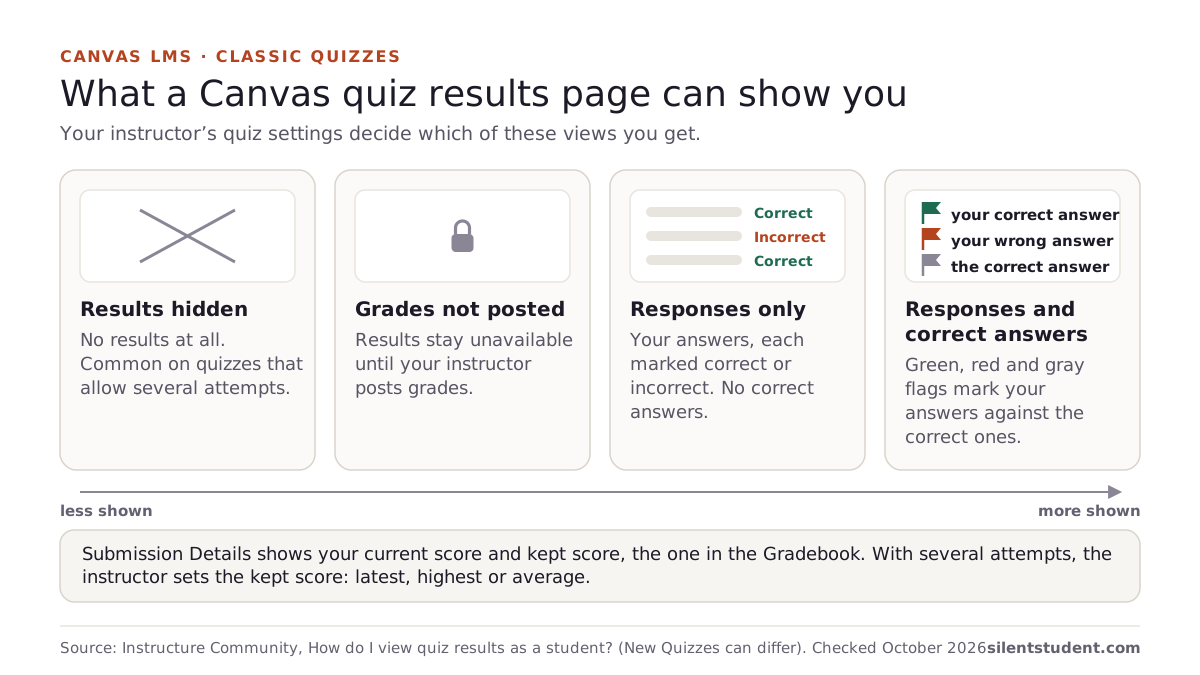
How to see Canvas quiz answers after you submit
Source: Instructure Community, How do I view quiz results as a student?, checked October 20, 2026.
Is Silent Student a Chrome extension?
No. It is a desktop app for Mac and Windows with its own browser, which it uses to sign in to Canvas. Nothing is installed in Chrome.
Can Silent Student auto-answer and submit Canvas quizzes?
Yes, for most quizzes. It reads each question, enters an answer and submits the attempt, and the run log records the score. It stops short in four cases. A graded, single-attempt, untimed quiz more than 20 minutes from its deadline is held for your review, and so is any quiz with an answer below 70% confidence. A quiz with fewer than half its questions answered is left open, not submitted. Calculated questions get only a generic text attempt, and in-quiz file-upload and hotspot questions are left blank. Canvas also has its own auto-submit: a timed quiz submits itself when time runs out.
Is Silent Student an AI test taker for Canvas?
For ordinary Canvas quizzes, yes. It takes Classic Quizzes and New Quizzes in its own browser, under your Canvas login, and submits them. It is not a test taker for exams behind Respondus LockDown Browser, Proctorio or Honorlock: it recognizes those and leaves them for you. Every submission shows in Canvas as yours, and your school’s academic integrity policy applies either way.
Does it work on a Chromebook?
No. It is a desktop app for Mac and 64-bit Windows. A Chromebook or iPad cannot run it.
Read next
- Best AI for Canvas quizzes and tests, compared
- Canvas Chrome extensions compared, and what Canvas quiz logs record
- Silent Student vs Canvas Quiz Solver
- AI that does your homework: four kinds compared
- Edpuzzle answer bot: video assignments linked in Canvas
- Discussion post template and examples
- Canvas Top Hat assignments: what the homework bot does
- Quizizz answer bot: Wayground homework quizzes linked in Canvas
- Platforms not listed here: what the Vision agent does with them
- What AI does Canvas use? IgniteAI, explained
Canvas LMS FAQ
Which Canvas assignment types does it handle?
Quizzes, essays (text entry and upload), discussion posts and file uploads, each routed to its own handler.
Does it do the external tools my Canvas course links to?
Yes. It follows the assignment’s link to WebAssign, MyLab, Connect, ALEKS, Top Hat or another tool and works it there. Proctored exams are the exception.
Can I review work before it's submitted?
Yes for written work: every draft is held until you approve or regenerate it. After that, a resubmission adds a new attempt and the first one stays visible to your instructor.
How does it decide what to do first?
Each sync scores your assignments by due date, so the most urgent one is worked first.
Does Silent Student have to stay open on screen to work Canvas?
No. It works the queue in the background while the app is open and the computer is awake.
What if my course uses a tool that isn't listed?
Queue it anyway. The general vision agent opens whatever the Canvas assignment links to and works the screen; the run log says which part, if any, is still yours.
Which AI detector does Canvas use?
None of its own. Instructure says “Canvas does not provide its own plagiarism detection tool.” If your institution has enabled a third-party tool, its plagiarism and originality details can show in SpeedGrader, and Instructure sends questions about that tool to “your institution or the provider of the tool.” Which checker your course uses, if any, is your school’s choice.
Is there a free Canvas answer bot?
Not from Silent Student: it has no free plan or free trial, and plans are $11.99, $24.99 or $49.99 a month, with a money-back guarantee if a problem on our side can’t be fixed within 3 days (request within 30 days, before you cancel; conditions apply). Several extensions have free tiers. SnapGPT gives 5 screenshot answers a day, and Canvas Quiz Solver warns that “free answers can run out mid-quiz.” Prices change, so check each tool’s own page.
Related platforms and tools
Platform pages and free tools related to Canvas.
Silent Student is not affiliated with, endorsed by, sponsored by, or certified by Canvas LMS or its owners. Canvas LMS is a trademark of its respective owner and is used here only to describe the software this product works with. Silent Student promises no grade or academic outcome; you are responsible for reviewing what is submitted under your name and for your institution's academic-integrity policies.
Queue your Canvas course
Connect Canvas once, check the queue it builds in due-date order, and approve written work before it posts.
Plans from $11.99/mo · Cancel anytime · See pricing