Last checked
SmartBook automationMcGraw Hill bot and SmartBook solver (2026): what Silent Student does, and McGraw Hill’s Terms
Short answer: Silent Student is a McGraw Hill bot for SmartBook, a Mac and Windows desktop app from $11.99 a month with a dedicated SmartBook solver. It opens the assignment from your Canvas course, answers each question itself and stops when the concept counter is full. McGraw Hill’s Terms bar AI agents. For Connect assignments, see the McGraw Hill Connect answer bot.
Does Silent Student work with McGraw Hill SmartBook?
Technically yes, but McGraw Hill’s Terms of Use bar AI agents, so read them first. Silent Student has a dedicated SmartBook solver: it opens the assignment from Canvas, answers and submits each question itself at High confidence, and stops when the concept counter is full. Its answers can be wrong, and it does not take proctored exams. Plans start at $11.99 a month.
| What it does | Multiple choice, true or false, multiple select, fill-in-the-blank, ordering and matching questions. After a miss it opens the reading SmartBook assigns, then returns to the questions. |
|---|---|
| What it doesn’t do | Connect homework or ALEKS with this solver (they run on the general screen-reading agent and have their own pages), or proctored exams. |
| Who submits | Silent Student. It submits each answer in SmartBook itself; there is no review step before an answer goes in. |
| Confidence rating | It rates every answer High. McGraw Hill asks students to “Make an honest attempt to assess your confidence level”, and SmartBook reports show instructors the confidence level each student chose. SmartBook tips |
| Plan | Every plan includes SmartBook: Base $11.99, Plus $24.99, Pro $49.99 a month. No free plan. Pricing |
| Benchmark | We publish no accuracy figure for SmartBook. What the benchmark covers |
| McGraw Hill’s Terms | Bar bots, AI agents and browser extensions from viewing, completing, answering or submitting assignments unless McGraw Hill authorizes it in writing (last updated October 16, 2026). Read the Terms |
| Last checked | October 20, 2026 |
What is a McGraw Hill bot?
A McGraw Hill bot is software that works a McGraw Hill assignment for you: it reads each SmartBook or Connect question, picks or types an answer and, in some tools, submits it. Students also call them McGraw Hill answer bots, SmartBook solvers or auto answer extensions. They come as desktop agents, such as Silent Student, and as Chrome extensions, such as auto-mcgraw. McGraw Hill’s Terms of Use, last updated October 16, 2026, bar any “agent, robot, spider, or other automatic device or program” and any third-party “AI agent” or “browser extension” acting in its service unless McGraw Hill authorizes it in writing.
Sources: McGraw Hill Terms of Use; GitHub, GooglyBlox/auto-mcgraw, checked October 20, 2026.
Is there a McGraw Hill SmartBook bot, solver or auto answer extension?
Yes, several kinds, and McGraw Hill’s Terms bar every third-party one. (a) Desktop agents such as Silent Student answer and submit each question. (b) auto-mcgraw, a free GitHub extension, fills answers from your ChatGPT, Gemini or DeepSeek tab and “is not published on the Chrome Web Store.” (c) Screen-reading extensions such as Apex Vision AI and SnapGPT leave submitting to you; SnapGPT says its Autopilot “never submits.” (d) Store-listed answer extensions such as Mindko’s Homework Solver. McGraw Hill’s own AI Reader explains passages rather than answering.
Sources: GitHub, GooglyBlox/auto-mcgraw; SnapGPT, SmartBook page; Apex Vision AI, FAQ; Chrome Web Store, Homework Solver by Mindko; McGraw Hill, AI in higher education, checked October 20, 2026.
How is a SmartBook assignment scored?
On points earned before the due date. McGraw Hill’s student guide says SmartBook scores are “based on number of points accumulated before the due date. Your score locks in when you either achieve 100% completion OR the due date arrives, whichever happens first.” After the due date the assignment “automatically goes into recharge mode”, and “Work completed in recharge mode will not affect your original score.”
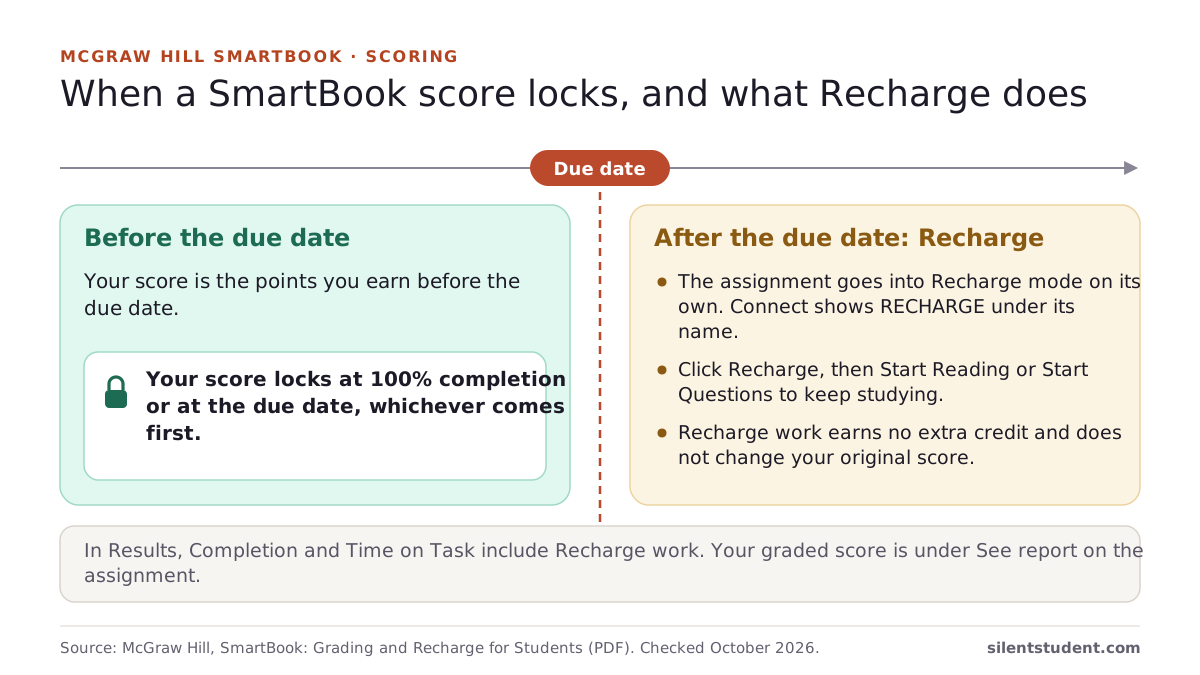
How McGraw Hill SmartBook assignments are graded
Source: McGraw Hill, SmartBook: Grading and Recharge for Students (PDF), checked October 20, 2026.
Is Silent Student a McGraw Hill answer bot?
Yes, for McGraw Hill assignments you open from Canvas. On SmartBook it runs a dedicated solver: it answers each question itself, rates every answer High, opens the reading SmartBook assigns after a miss, and stops when the concept counter is full. Connect homework, accounting worksheets and ALEKS open from the same Canvas link but are worked by its general screen-reading agent; each has its own page with the limits. It submits each answer with no review step, its answers can be wrong, and it does not take proctored exams. McGraw Hill’s Terms bar AI agents, so read them first.
Is there a SmartBook answer key?
No: SmartBook is adaptive, and McGraw Hill’s SmartBook Assignment Tips say “The number of questions you get is influenced by your accuracy.” A missed question “will be repeated later in the same session,” though “It might not be the exact same question, but rather a variant that represents the same learning objective.”
How to finish SmartBook assignments faster
Source: McGraw Hill support, SmartBook Assignment Tips, checked October 20, 2026.
Which SmartBook question types does Silent Student handle?
| Question type | Handled | Notes |
|---|---|---|
| Multiple choice | Yes | Matched by the choice text, not its position. |
| True or false | Yes | |
| Multiple select | Yes | |
| Fill in the blank | Yes | |
| Ordering (drag to sort) | Yes | |
| Matching | Yes | |
| Reading after a miss | Yes | Opens the reading SmartBook assigns, then returns to the questions. |
| Confidence rating | Always High | Not a calibrated read of how sure it is. |
| Other question types | Not built for them | If an answer will not fill, the run stops and the log says where. |
| Proctored exams or a lockdown browser | No | Yours to take. |
What it will not do on SmartBook
SmartBook has a purpose-built solver. The rest of McGraw Hill runs on the general agent, and the difference matters.
- Connect and ALEKS use the general agent. SmartBook adaptive recall is the dedicated path. Connect homework, worksheets and ALEKS open through the same Canvas flow but are worked by the general vision agent, which is less predictable than a purpose-built solver. See the Connect and ALEKS pages for what each covers and where each stops.
- Every probe is submitted at high confidence. SmartBook bundles your answer with a confidence rating. Silent Student rates every answer High; it is not a calibrated read of how sure it is, and SmartBook reports show the rating to your instructor.
- A miss costs a reading detour, not a retry. SmartBook routes a wrong answer to a reading and asks that concept again later. Silent Student opens the reading SmartBook assigns, then returns to the questions, so a run with several misses takes longer.
- It finishes on SmartBook's terms. The run ends when the real concept counter is full, not after a fixed number of questions. One concept can span several probes, so the length of the assignment is not knowable up front. If you work SmartBook yourself, see how to finish SmartBook assignments faster.
- Its answers can be wrong. Answers come from an AI model reading the question. A wrong answer costs points and a reading detour, and we publish no SmartBook accuracy figure.
How much does Silent Student cost for SmartBook?
Every plan includes SmartBook, billed monthly. There is no free plan, and no free trial for general signups; a money-back guarantee applies if a problem on our side can’t be fixed within 3 days (request within 30 days, before you cancel; conditions apply).
| Plan | Price | Includes |
|---|---|---|
| Base | $11.99 a month | 1× monthly usage pool |
| Plus | $24.99 a month | 2× usage and the advanced pro model |
| Pro | $49.99 a month | Unlimited usage (fair use) and the pro model |
See Silent Student pricing and plans and the guarantee.
Does it work on proctored SmartBook exams?
No. Silent Student does not take proctored exams, including tests run under Proctorio or a lockdown browser. It works SmartBook and other homework; those exams are yours to take.
Silent Student vs other tools for SmartBook
SmartBook tools come in four kinds: a desktop agent, a GitHub extension, screen-reading extensions and store-listed answer extensions. McGraw Hill’s Terms bar all four. Its own AI Reader explains passages and does not answer. auto-mcgraw’s README warns that copies of it on the Chrome Web Store are unofficial.
| Tool | What it is | Who enters answers | Submits? | Price |
|---|---|---|---|---|
| Silent Student (ours) | Desktop app for Mac and Windows | Silent Student answers each question | Yes, each answer at High confidence | $11.99, $24.99 or $49.99 a month; no free plan |
| auto-mcgraw | Chrome extension, from GitHub only | The extension, using your ChatGPT, Gemini or DeepSeek tab | Yes, unless you turn on “Pause Before Submit” | Free (MIT licence) |
| SnapGPT | Chrome and Firefox extension | You, or Autopilot on its paid plan | “It never submits”; you review and submit | Free 5 answers a day; Plus $9.99 a month |
| Apex Vision AI | Chrome extension, plus iOS and Android apps | You; on its Mastermind plan, AI Agents “fill answer boxes” | No; you review the work “before submitting it yourself” | Free 30 requests, refilled every 12 hours; $7.99 to $19.99 a month |
| Chrome Web Store extensions, e.g. Mindko | Store-listed answer extensions; Mindko’s Homework Solver lists 10,000 users | Mindko’s site says it “Auto-selects the correct answer” | Not stated by Mindko | Mindko: 3 days free, then $19.99 a month |
We make Silent Student. Other rows quote their own pages, checked October 20, 2026: auto-mcgraw, SnapGPT, Apex Vision AI, Chrome Web Store extensions, e.g. Mindko.
Guides for McGraw Hill SmartBook
- How is SmartBook graded?On completion before the due date. Confidence ratings don’t move the progress bar, wrong answers lengthen the assignment, and Recharge doesn’t change the score.
- McGraw Hill Connect and SmartBook: login, grades and help
- Auto-McGraw on GitHub: does it still work?
- Homework automation apps: what each one actually automates
- How do you finish SmartBook assignments faster?Miss fewer questions. What sets a SmartBook assignment’s length, McGraw Hill’s own pacing tips (highlights, honest confidence, ReadAnywhere, stopping at 100%) and the shortcuts that make it longer.
- Is there a McGraw Hill Connect answer key?No usable one. Many Connect questions are algorithmic, so each student gets different numbers, and test banks are for instructors. Covers accounting homework, Check my work, guided solutions and what instructors see.
- Is McGraw Hill Connect proctored?Only on assignments labeled Proctoring Enabled. Connect uses Proctorio: the free Basic package can record your webcam, and Plus ($17.50) adds audio, screen and web-traffic recording and desk scans. Covers what a test needs and who sees the data.
- What do Canvas, McGraw Hill, Pearson, Cengage and IXL say about AI tools?The exact Terms clauses on bots, AI agents, browser extensions and login sharing for every platform we cover, with section, date and source, plus what McGraw Hill, IXL and Pearson changed in 2026.
What does Silent Student do on McGraw Hill SmartBook?
SmartBook adaptive recall, end to end — probe, answer, high confidence, remediation reading, until the concept counter is full.
Adaptive recall, end to end
SmartBook picks the next question from your progress. The solver holds one session and answers the question actually on screen.
Confidence rated high
SmartBook asks for a confidence rating with every answer. Silent Student rates every answer High. McGraw Hill asks students to rate their confidence honestly, and SmartBook reports show the rating to your instructor.
Built for SmartBook's probe types
Multiple choice, multiple select, fill-in-the-blank, dropdown, drag-to-order and matching, matched by text, not position.
Concepts, not questions
It reads the real “N of N concepts” counter and keeps going until that counter is full.
Handles the reading detours
It opens the reading SmartBook assigns after a miss, then returns to the questions.
Launches from inside Canvas
It opens the assignment through the Canvas launch and clicks past the Welcome and Continue Questions screens.
How does Silent Student work on McGraw Hill SmartBook, step by step?
Point it at the assignment
Open your Canvas course in the Silent Student desktop app and pick the McGraw Hill SmartBook assignment you want worked.
It launches and reaches the questions
The bot follows the Canvas LTI handoff into learning.mheducation.com, clicks through the Welcome and gateway screens, and lands on the live probe.
It works the adaptive path
Read the question, answer it, rate it High, advance. After a miss it opens the reading SmartBook assigns, then returns to the questions, through the whole adaptive set.
It finishes when the concepts are mastered
When the concept counter reads N of N and the completion screen appears, it stops. You come back to a finished assignment instead of a half-mastered one.
Can McGraw Hill detect AI or a bot in SmartBook?
We found no McGraw Hill page that says how, or whether, SmartBook detects AI help or bots, so we make no claim either way. McGraw Hill does say what instructors see: a SmartBook report’s student page “displays individual assignment progress, time spent, and learner metacognition details,” including whether each answer was right and the confidence level chosen. The Terms bar AI agents whether or not anything is detected, and McGraw Hill “may, but is not obligated to, report any such violation to your educational institution.” Silent Student does not hide or fake any of this. It rates every answer High, and the report shows that. Your school’s academic-integrity policy applies.
Sources: McGraw Hill, SmartBook reports in Connect (PDF); McGraw Hill Terms of Use, checked October 20, 2026.
Is there a McGraw Hill bot on GitHub?
Yes, for SmartBook. The best known is GooglyBlox/auto-mcgraw: 79 stars, MIT licence, last updated September 30, 2026. Its README says it works through your own ChatGPT, Gemini or DeepSeek tab, that GitHub is “the only official place to download the extension,” and that copies on the Chrome Web Store are “fraudulent/unofficial reuploads.” Older SmartBook repos are idle: Stephenjoel2k/SmartbookSolver was last changed in September 2021, and micahlt/smarterbook is archived. McGraw Hill’s Terms bar these tools whether they are free or paid.
Sources: GitHub, GooglyBlox/auto-mcgraw; GitHub, Stephenjoel2k/SmartbookSolver; GitHub, micahlt/smarterbook, checked October 20, 2026.
Is there a free SmartBook bot?
Yes, a few, though free does not change McGraw Hill’s Terms. auto-mcgraw is free and open source under the MIT licence; you supply the AI tab. SnapGPT’s free plan gives 5 answers a day, and you enter them. Apex Vision AI’s free tier gives 30 requests, refilled every 12 hours. McGraw Hill’s AI Reader, which explains passages instead of answering, has no separate price listed. Silent Student has no free plan; Base is $11.99 a month.
Sources: SnapGPT, SmartBook page; Apex Vision AI, pricing; GitHub, GooglyBlox/auto-mcgraw, checked October 20, 2026.
What sets the length of a SmartBook assignment?
There is no fixed length. McGraw Hill’s tips say “Progress in SB assignments is made by completing concepts,” and the number of questions depends on how many you get right, so each miss adds questions and sometimes a reading. Instructors can see the result: SmartBook’s Completion Time report compares an estimated completion time with how long each student actually took. Silent Student follows the same path and stops when SmartBook shows N of N concepts.
Sources: McGraw Hill support, SmartBook Assignment Tips; McGraw Hill, SmartBook reports in Connect (PDF), checked October 20, 2026.
Does McGraw Hill allow bots, AI agents or browser extensions?
No. McGraw Hill’s Terms of Use, last updated October 16, 2026, say you may not use any “agent, robot, spider, or other automatic device or program” to access the service. They also bar you from using or enabling a third-party “browser extension” or “AI agent” to act within it, including “to view, complete, answer, or submit any assessment, assignment, or other activity”, unless McGraw Hill authorizes it in writing. McGraw Hill says it may suspend or terminate an account it has reason to believe was used in violation. Your school’s academic-integrity policy is separate and may be stricter. Under Silent Student’s Terms (section 5) you are responsible for both.
Source: McGraw Hill Terms of Use, checked October 20, 2026.
Is Silent Student a McGraw Hill auto answer extension?
No. Silent Student is a desktop app for Mac and Windows with its own browser, and nothing is installed in Chrome. It opens SmartBook from your Canvas course in that browser and answers there. If you want an extension, auto-mcgraw (from GitHub only) and SnapGPT are extensions; the comparison table on this page shows who enters answers and who submits in each. McGraw Hill’s Terms bar browser extensions and AI agents alike.
Read next
- AI for McGraw Hill SmartBook: AI Reader and AI extensions, compared
- Silent Student vs Apex Vision AI
- McGraw Hill Connect answer bot and assignment bot: facts and Terms
- ALEKS AI solver: facts and Terms
- Is Silent Student legit? What you can check yourself
- Watch the Connect accounting replica run (video)
- SmartBook 2.0 and LearnSmart in Connect
- Download Silent Student for PC and Mac: requirements and install steps
McGraw Hill FAQ
Does it actually treat SmartBook as adaptive, or just blast through a fixed list?
It treats SmartBook as adaptive: it holds one live session and answers the exact question on screen, following the path SmartBook hands it. McGraw Hill’s own SmartBook tips call SmartBook one of its “adaptive learning systems designed to help students learn faster, study more efficiently, and retain more knowledge.”
Why does it rate every answer High confidence?
That is how the SmartBook solver is built: it rates every answer High, not a calibrated read of how sure it is. McGraw Hill asks students to “Make an honest attempt to assess your confidence level on each question,” and reports show instructors the level chosen.
What happens when it gets a probe wrong?
SmartBook routes a miss to a reading and asks that concept again later. Silent Student opens the reading SmartBook assigns after a miss, then returns to the questions and answers that concept again when it comes back around.
Is it a SmartBook auto solver, start to finish?
Yes, once you pick the SmartBook assignment in Canvas. It follows the Canvas launch into SmartBook, clicks past the Welcome and Continue Questions screens, answers each question, opens the reading SmartBook assigns after a miss, and stops when SmartBook shows N of N concepts. You don’t click between questions. The run has no fixed length, because SmartBook adds questions after each miss.
Does the McGraw Hill bot work on Connect homework or ALEKS?
Yes, through the general vision agent rather than a SmartBook-style solver. Connect homework and accounting worksheets, and ALEKS learning-mode topics, open from the same Canvas link and are worked on screen. Each has its own page with the limits spelled out.
Will rearranged answer choices throw it off?
No. It matches each answer by the choice text, not its position.
Related platforms and tools
Platform pages and free tools related to McGraw Hill SmartBook.
Silent Student is not affiliated with, endorsed by, sponsored by, or certified by McGraw Hill or its owners. McGraw Hill is a trademark of its respective owner and is used here only to describe the software this product works with. Silent Student promises no grade or academic outcome; you are responsible for reviewing what is submitted under your name and for your institution's academic-integrity policies.
Queue the SmartBook assignment from Canvas
Pick the SmartBook assignment in your Canvas course and check the concept counter in the run log.
Plans from $11.99/mo · Cancel anytime · See pricing