Last checked
Packback discussionsPackback discussion bot (2026): AI that writes your Packback questions and replies
Short answer: Silent Student is a Mac and Windows desktop app, from $11.99 a month, that opens Packback from your Canvas course, writes your question and replies with AI and publishes them itself. Unlike the Canvas essays and discussions it holds for your approval, Packback posts have no approval step, and Packback moderates posts it judges AI-written.
Does Silent Student work with Packback?
Yes. Silent Student has a dedicated Packback solver. It opens Packback from your Canvas assignment, reads the required number of questions and responses and any minimum curiosity score, then writes the posts with AI and publishes them itself, with no approval step. Packback assigns the score and can moderate posts it judges AI-written. From $11.99 a month.
| What it does | Writes and publishes the required open-ended questions and the replies to classmates’ posts, choosing posts with the fewest replies first. |
|---|---|
| What it doesn’t do | Packback Deep Dives writing assignments, sources or images in posts, editing a moderated post, or a promised curiosity score. |
| Who publishes | Silent Student, during the run. Packback posts are not held for your approval the way Silent Student holds Canvas essays and discussions. |
| Curiosity target | The minimum in your instructor’s requirements plus 15 points. Packback scores each post out of 100 after it is posted. Packback grading |
| Plan | Every plan includes Packback: Base $11.99, Plus $24.99, Pro $49.99 a month. No free plan. Pricing |
| Benchmark | We publish no curiosity-score results for Packback. What the benchmark covers |
| Packback’s rules | Its Terms of Use bar “any other automated activity in connection with the Packback Platform” used to access it, and posts written “fully (or in part)” with generative AI are a moderation reason. Read the Terms |
| Last checked | October 20, 2026 |
What are Packback questions, and how do Packback discussions work?
Packback Discussions is, in Packback’s words, “a student-led, inquiry-driven dedicated discussion platform.” A Packback question is the post that starts a thread: an open-ended question of your own. A response answers a classmate’s question, and students can reply to responses with “Counterpoints” or “Supporting Points.” Your instructor sets the deadline, how many questions and responses count, and sometimes a minimum Curiosity Score per post. Packback says students get “feedback on their writing and post efficacy while they type.”
Sources: Packback, Packback Discussions; Packback Help Center, How are assignments graded?, checked October 20, 2026.
What goes into a Packback Curiosity Score?
Packback scores every post out of 100 on Curiosity, Communication and Credibility, and its instructor guide says Convention, meaning grammar, “is not calculated into a user’s Curiosity Score.” Packback does not publish the weights.
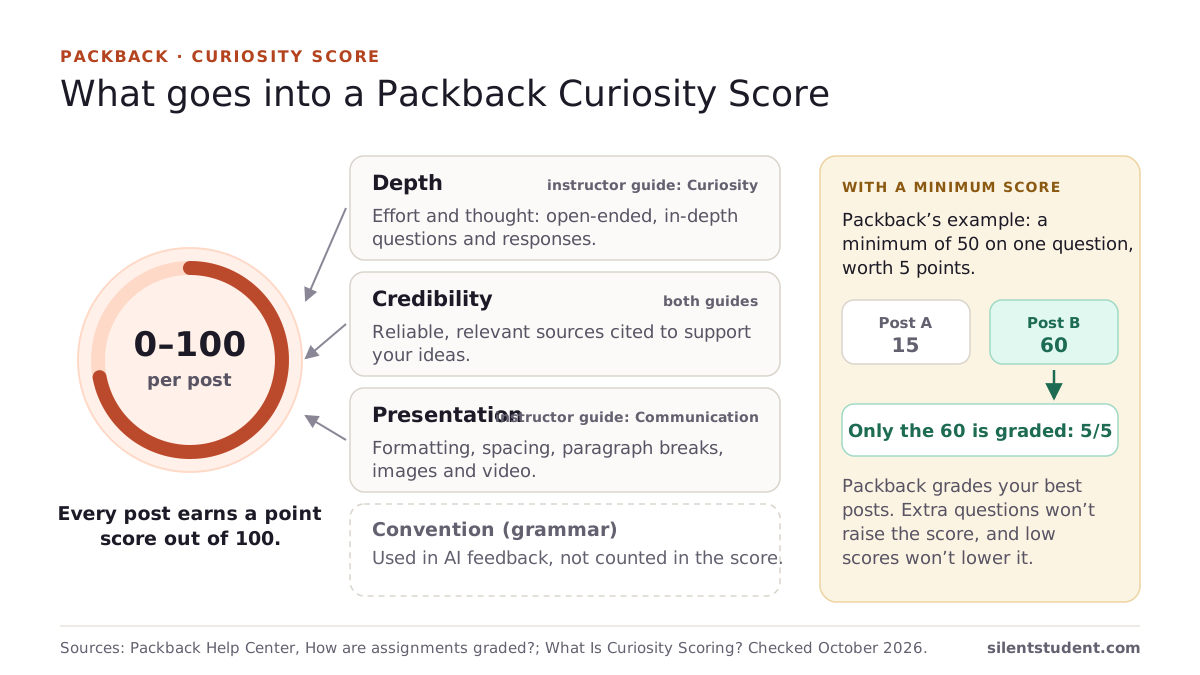
How the Packback Curiosity Score works, with Packback’s grading example
Sources: Packback Help Center, How are assignments graded?; Packback Help Center, What Is Curiosity Scoring?, checked October 20, 2026.
Which Packback question types does Silent Student handle?
Packback discussions have two kinds of post, questions and responses. The rows below also cover the parts of a post Packback’s score rewards.
| Question type | Handled | Notes |
|---|---|---|
| Open-ended discussion questions | Yes | Title and body, written against the professor’s prompt. |
| Responses to classmates | Yes | Least-replied posts first; skips its own posts and the instructor’s. |
| Required counts and minimum score | Yes | Read from the assignment’s requirements. |
| Cited sources | No | Packback’s Credibility criterion rewards them; add them yourself. |
| Images or video | No | Text only. |
| Packback Deep Dives (writing assignments) | No | Discussions only. |
| Editing or republishing a moderated post | No | Do it in Packback before the deadline. |
What it will not do on Packback
Packback behaves differently from the rest of the product. Read this before you queue it.
- There is no approval step. Canvas essays, discussions and file uploads are drafted and held. Packback posts are not: they publish directly during the run. If reviewing before publication matters to you on this assignment, do not queue it and walk away.
- Posts are AI-written, and Packback moderates AI-written posts. Packback lists a post written “fully (or in part)” with generative AI as a moderation reason, and a moderated post loses its credit until you edit and republish it. We make no promise about moderation or any AI checker.
- The curiosity score is a target, not a result. It writes to clear the instructor’s minimum with room to spare. Packback assigns the score after the fact, and we cannot promise what it will be.
- No sources or media. Packback rewards cited sources and formatting with images or video. Silent Student writes text only, so add sources yourself if your score needs them.
- The writing is casual on purpose. Posts are written in a plain student register and can include small slips. Read what it posted and edit in Packback before the deadline if that matters to you.
- It depends on the Canvas LTI launch. Packback is reached by following your Canvas assignment link through the LTI handoff. If that handoff fails, commonly a stale Packback session, the run reports the failure rather than posting something half-formed.
How much does Silent Student cost for Packback?
Every plan includes Packback, billed monthly. There is no free plan, and no free trial for general signups; a money-back guarantee applies if a problem on our side can’t be fixed within 3 days (request within 30 days, before you cancel; conditions apply).
| Plan | Price | Includes |
|---|---|---|
| Base | $11.99 a month | 1× monthly usage pool |
| Plus | $24.99 a month | 2× usage and the advanced pro model |
| Pro | $49.99 a month | Unlimited usage (fair use) and the pro model |
See Silent Student pricing and plans and the guarantee.
Guides for Packback
- Does Packback detect AI or ChatGPT? What Packback says it checks
- How to write a discussion post: template and examples
- Out of time for a discussion post? Four options compared
- How to respond to a discussion post, with examples
- How does the Packback Curiosity Score work?Every post is scored out of 100 on curiosity, credibility and communication. How a minimum score turns into points, and where to see yours.
- What do Canvas, McGraw Hill, Pearson, Cengage and IXL say about AI tools?The exact Terms clauses on bots, AI agents, browser extensions and login sharing for every platform we cover, with section, date and source, plus what McGraw Hill, IXL and Pearson changed in 2026.
What does Silent Student do on Packback?
Writes the discussion question and the replies to classmates, aiming above the instructor’s minimum curiosity score.
Written to the professor’s prompt
Each question is written against the instructor’s actual prompt and your course context as an open-ended question with no single right answer, the kind Packback’s guidelines ask for.
Your voice, if you give it samples
Add a few pieces of your own writing and Silent Student builds a style profile it applies to your posts. Without samples it writes in a plain, casual register.
Curiosity-score aware
It reads the minimum curiosity score from the assignment’s requirements and aims about fifteen points above it. Packback assigns the actual score.
Real replies to classmates
It reads the live discussion feed, skips anything you posted this run, and replies to classmates’ posts, favoring the ones with the fewest replies so your participation is not piled onto the same popular thread. For discussion that happens on the reading itself, see Perusall.
Counts read from the assignment
It reads how many questions and responses the grading period asks for and posts that many, with two spare reply targets in case a post is empty or its reply form errors.
Every post logged
The run log lists each question and reply it published, so you can read them in Packback and edit before the deadline.
How does Silent Student work on Packback, step by step?
Point it at the assignment
Silent Student launches Packback through Canvas, confirms the LTI handoff, and reads the discussion requirements: the question count, the reply count, and any minimum curiosity score.
It writes the posts
It drafts the question and the replies against the prompt. Because Packback posts publish directly, the wording is final when it posts; there is no approval step.
It posts and replies
It submits your question, reads the live feed, and replies to classmates’ posts one at a time, retrying or skipping a form error without losing the whole assignment.
You read the log
The run finishes on its own and logs exactly what it posted, so you can read your own contribution afterwards and edit it in Packback until the deadline.
What makes a good Packback question?
An open-ended one. Packback’s discussion guidelines say to “Ask open-ended questions that can’t simply be Googled” and to ask questions “that do not have a single accepted ‘right’ answer.” A closed-ended question, one with “a straightforward response” that “can be found on Google or in a textbook,” is a moderation reason.
Sources: Packback Help Center, Discussion Assignment Guidelines; Packback Help Center, the Closed-Ended moderation reason, checked October 20, 2026.
Can you edit a Packback post or post late?
You can edit until the deadline: “Once the deadline for the assignment has passed, you can no longer edit your posts for that assignment.” You can post at any time, but a post counts toward the grading period it falls in, and Packback is “unable to change the timestamps on posts to match a desired Grading Period.”
Sources: Packback Help Center, How can I edit my question or response?; Packback Help Center, How are assignments graded?, checked October 20, 2026.
Will Packback flag or moderate posts Silent Student writes?
It can. Packback says it flags AI-generated text before you submit, shows an AI Risk indicator while you write, and can moderate a post “written fully (or in part) with the use of a generative AI model like ChatGPT.” Silent Student’s posts are AI-written, and it does nothing to hide them from those checks. A moderated post earns no credit until you edit and republish it; Packback emails you the reason, and Silent Student does not edit or republish it for you. We make no promise about how a post is rated or moderated.
Can Packback detect AI or ChatGPT? What its AI check reads
Sources: Packback Help Center, the “Post may have been generated by AI” moderation reason; Packback FAQ; Packback Help Center, How do I use the AI Risk indicator?; Packback Help Center, What if my posts were moderated?, checked October 20, 2026.
Does Packback allow bots or AI-written posts?
Its Terms of Use say you may not use “automated web queries (including, without limitation, screen and database scraping, spiders, robots, crawlers and any other automated activity in connection with the Packback Platform) to access the Packback Platform.” Its moderation guide lists a post “written fully (or in part) with the use of a generative AI model like ChatGPT” as a reason it may be moderated. In our reading, both reach Silent Student. We are not lawyers. Read them, and your school’s policy, before you decide.
Sources: Packback Terms of Use; Packback Help Center, the “Post may have been generated by AI” moderation reason, checked October 20, 2026.
Is Silent Student Packback’s own AI tool or writing assistant?
No. Packback’s AI gives writing feedback inside Packback, and its FAQ says “Packback will never generate content for students.” Silent Student is a separate desktop app for Mac and Windows, not affiliated with Packback, that writes your questions and replies with AI and publishes them itself during the run. Packback’s Terms of Use bar automated access to the platform, so read them and your school’s policy before you queue it.
Sources: Packback FAQ; Packback Terms of Use, checked October 20, 2026.
Is there a Packback curiosity score checker?
Packback’s own Instant Feedback is the closest thing: it previews a post’s Curiosity Score range and gives early warnings while you write, before you publish. Silent Student has no checker. It reads the minimum from your instructor’s requirements, writes to clear it by about 15 points, and Packback assigns the real score after the post is up.
How the Packback Curiosity Score works, and the highest score
Is it a Chrome extension?
No. Silent Student is a desktop app for Mac and Windows with its own browser. It opens Packback from your Canvas course there; nothing is installed in Chrome.
Packback FAQ
Do I get to approve a Packback post before it goes live?
No, and this is the one place Packback differs from Canvas. Canvas essays, discussion posts and file uploads are always drafted and held for your approval. Packback posts publish directly as part of the run. If you want to see the wording before it is public, do not queue Packback and walk away; read the log and edit in Packback before the deadline.
How does Silent Student write my Packback posts?
With an AI model, against the professor’s prompt and your course context, and in your style if you have added writing samples. The writing is casual and can include small slips. Packback can moderate posts it judges AI-written, and you are responsible for your school’s academic-integrity rules.
Does it actually reply to classmates, or just post a question?
Both. It reads the live discussion feed, filters out anything it posted this run, and replies to classmates’ posts. It prefers posts with fewer existing replies so your participation is not all piled onto the same popular thread. For replies you write yourself, see how to respond to a discussion post.
Can I make it sound like me?
Yes, if you give it something to work from. Add a few of your own writing samples and Silent Student builds a style profile it applies to your posts. Without samples there is nothing to match, and it writes in a plain, casual register instead.
How many Packback questions and responses does it post?
As many as your instructor’s requirements ask for in that grading period. It reads the required number of questions and responses, and any minimum Curiosity Score, from the assignment, then posts that many. It keeps two spare reply targets in case a classmate’s post is empty or its reply form errors.
Does it do Packback Deep Dives?
No. Silent Student handles Packback discussions only: your questions and your responses to classmates. Packback Deep Dives writing assignments are not supported, and it adds no sources, images or video to a post.
Related platforms and tools
Platform pages and free tools related to Packback.
Read next: Packback’s AI policy, and what the Curiosity Score measures.
Silent Student is not affiliated with, endorsed by, sponsored by, or certified by Packback or its owners. Packback is a trademark of its respective owner and is used here only to describe the software this product works with. Silent Student promises no grade or academic outcome; you are responsible for reviewing what is submitted under your name and for your institution's academic-integrity policies.
Queue the Packback discussion
Read the run log afterwards: what it posted, where, and which replies it skipped. You can edit in Packback until the deadline.
Plans from $11.99/mo · Cancel anytime · See pricing