What does Packback score a post on?
Three things, plus a fourth it checks but doesn’t count. Packback’s help center says its algorithm “scores individual posts based on three main criteria: Curiosity, Communication, and Credibility,” and that Convention “is not calculated into a user’s Curiosity Score to ensure English Language Learners (ELL) are not penalized.”
| Criterion | Counts toward the score? | What Packback says it looks at |
|---|---|---|
| Curiosity | Yes | “The effort, interest, thought process, and ‘discuss-ability’” of a post: whether a question is open-ended, the length and depth of the description, and how repetitive the text is. |
| Credibility | Yes | “The strength of the sources students cite.” Instant Feedback checks for “the presence of a cited source.” |
| Communication | Yes | “Appropriate spacing, paragraph breaks, formatting, and the use of media.” |
| Convention | No | Grammar, spelling, sentence fluency and language. Packback still gives feedback on it, and plagiarism falls under this category but “is checked only after submission.” |
Packback’s student grading article names the parts Depth, Credibility and Presentation instead. The idea is the same. Packback does not publish how the criteria are weighted.
What is the highest Curiosity Score on Packback?
100 for a single post. The help center says “Every post earns a point score out of 100.” Your profile also shows a running total: Packback says your Curiosity Score there is “an accumulation of the Curiosity Points you’ve earned on your posts,” and the Learner Leaderboard ranks classmates by “the total number of Curiosity Points a student earned in your community.” Packback notes that “some professors use this for extra credit.” To see what high-scoring posts look like, Packback points to the Featured tab.
Is the Curiosity Score your grade?
No. Packback says “The Curiosity Score is not meant to be a ‘grade’; it’s meant to be a measure of some of the key elements in a post.” Your grade comes from the requirements your instructor sets. Packback names the parts as “the weekly deadline, the number of questions and responses, and (potentially) a minimum Curiosity Score per post.” A post has to land before the deadline of the grading period it counts toward, and Packback says it is “unable to change the timestamps on posts.”
What happens if a post is below the minimum Curiosity Score?
It depends on one checkbox in your instructor’s setup. Packback’s instructor guide calls the minimum “the minimum score that each post should meet for students to receive full credit.” Instructors can tick a box so posts below it earn half credit; “Otherwise, students will receive zero points for any that do not meet the minimum.”
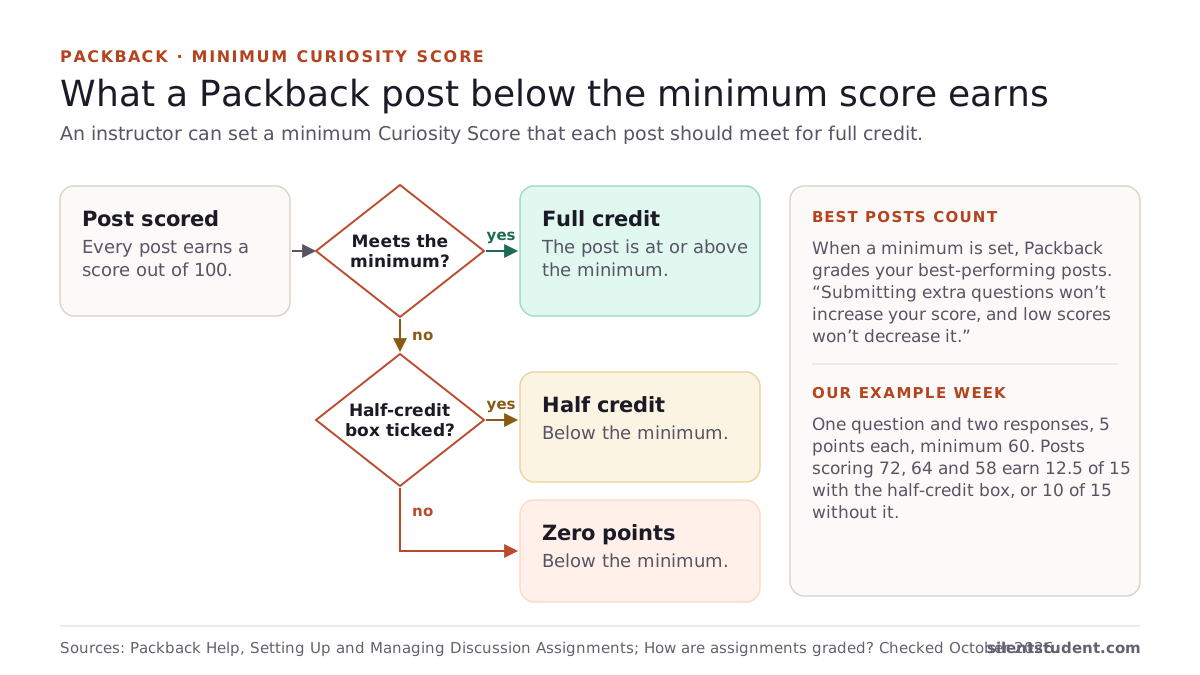
Packback also grades your best posts. Its student guide says “When a curiosity score minimum is set, Packback grades your best-performing posts,” and that “Submitting extra questions won’t increase your score, and low scores won’t decrease it.”
Here is how those rules play out for a made-up week: one question and two responses required, each worth 5 points, minimum score 60.
| Posts you made | Half credit box on | Half credit box off |
|---|---|---|
| Question 72; responses 64 and 58 | 5 + 5 + 2.5 = 12.5 of 15 | 5 + 5 + 0 = 10 of 15 |
| Add a third response that scores 61 | 15 of 15 (the 61 replaces the 58) | 15 of 15 |
| Add a second question that scores 40 | No change | No change |
The table is our application of Packback’s published rules, not a Packback example, and your instructor’s point values may differ. Your Participation Report shows the real setup under “Show Deadline Details.”
Where do you find your Curiosity Score?
In three places, according to Packback: on your global profile under All-Time Stats, with a per-class breakdown in its Activity section; at the top of your community-level profile; and at the bottom of each post, where an icon shows that post’s score. For your grade, open “View My Grades” below your name to reach the Participation Report. If a grade looks low, Packback’s advice is to check that you posted the required number of questions and responses before the deadline, and that each met the minimum if there is one.
How do you raise a Packback Curiosity Score?
Packback’s own suggestions, from its help articles:
- Ask an open-ended question. Packback says one “cannot be answered in one word, or by yes/no, or through a quick Google search.”
- Cite a source in the “Cite your Source” box, separating several with semicolons.
- Format the post: paragraph breaks, and bold, italics or underlining where they help.
- Add media. Packback says it accepts video links from YouTube, Vimeo and Daily Motion only.
- Vary your sentences. Packback says to watch for “multiple sentences in a row beginning with the same word.”
Is there a Curiosity Score checker? Packback’s Instant Feedback is the closest thing. Packback says it gives students “a preview of their Curiosity Score range” and “early alerts if their post may be flagged” while they write.
Does a moderated post still count?
Not while it is moderated. Packback says such posts “will not count towards your participation or score,” and that you can edit and republish them from your Discussion Posts page. One moderation reason is a post “written fully (or in part) with the use of a generative AI model like ChatGPT.” Packback says a republished post keeps its original posting date and earns full credit if you republish it before your instructor pulls grades for that deadline period. Packback’s AI policy is covered in more depth in our post on Packback’s AI policy.
Where Silent Student fits
We make Silent Student, a desktop app for Mac and Windows from El Dorado Ignition LLC. It has a dedicated Packback solver that opens Packback from your Canvas assignment, reads the required questions, responses and any minimum Curiosity Score, and writes the posts with AI.
- Packback posts publish with no approval step. On Canvas, our app holds written work for your approval; on Packback it does not. If you want to read a post before it goes up, don’t queue that assignment.
- It writes to clear your instructor’s minimum by about 15 points, but Packback assigns the score after posting, and we can’t promise it. It does not show a score before it posts, and it adds no sources or media.
- The posts are AI-written, and Packback lists AI-written posts as a moderation reason. We make no promise about moderation.
- Plans are $11.99, $24.99 or $49.99 a month, with no free plan.
Packback’s Terms. Packback’s Terms of Use say you may not use “automated web queries (including, without limitation, screen and database scraping, spiders, robots, crawlers and any other automated activity in connection with the Packback Platform) to access the Packback Platform.” In our reading, that reaches Silent Student. We are not lawyers. Your school’s academic-integrity policy applies too.
More: Silent Student on Packback. To see what a week of Packback points does to a points-based class grade, try the points grade calculator.
Questions people ask
What is the highest Curiosity Score on Packback?
100 per post. Packback says every post earns a point score out of 100. Your profile also adds up the Curiosity Points from all your posts, and the Learner Leaderboard ranks classmates by that total.
What is a good Packback Curiosity Score?
Packback doesn’t define one, and it says a 70 is not the same as a C. For your grade, the number that matters is your instructor’s minimum Curiosity Score, if they set one.
Is there a Packback Curiosity Score checker?
Packback’s Instant Feedback shows a preview of your Curiosity Score range and early warnings while you write, before you publish.
Does grammar affect the Curiosity Score?
No. Packback says Convention, which covers grammar and spelling, is not calculated into the Curiosity Score so English Language Learners are not penalized. It still gives feedback on it.
Do extra Packback posts raise my grade?
Not when a minimum is set. Packback grades your best-performing posts and says extra questions won’t increase your score and low scores won’t decrease it.
What happens to a post below the minimum Curiosity Score?
It earns half credit if your instructor ticked that option, and zero points otherwise, according to Packback’s instructor setup guide.
Can I approve a Packback post before Silent Student publishes it?
No. Packback posts publish directly during the run, with no approval step. If you want to read a post first, don’t queue that assignment.
Sources
All fetched and checked October 20, 2026 unless a line says otherwise.
- What Is Curiosity Scoring? (Packback Help)
- Instant Feedback and Curiosity Scoring (Packback Help)
- How are assignments graded? (Packback Help)
- Setting Up and Managing Discussion Assignments (Packback Help, for instructors)
- How to Interpret Your Packback Discussions Grade (Packback Help)
- Where can I find my Curiosity Score? (Packback Help)
- How do I improve my Curiosity Score? (Packback Help)
- Why is my grade lower than I Expected? (Packback Help)
- What is the Learner Leaderboard? (Packback Help)
- The “Post may have been generated by AI” moderation reason (Packback Help)
- Packback Terms of Use (no revision date shown on the page)
How this guide was made. We read each Packback page listed above on October 20, 2026, through Packback’s own help center, and quote them directly. The grading table applies Packback’s published rules to a made-up week. We wrote the guide with AI assistance and checked each quote against its source.
Related: Packback’s AI policy, explained · How to write a discussion post · All guides · Packback · Points grade calculator
Written by the company that makes Silent Student. Silent Student is not affiliated with or endorsed by Packback. Packback is a trademark of its owner.