What does “calculation of totals has been disabled” mean in Canvas?
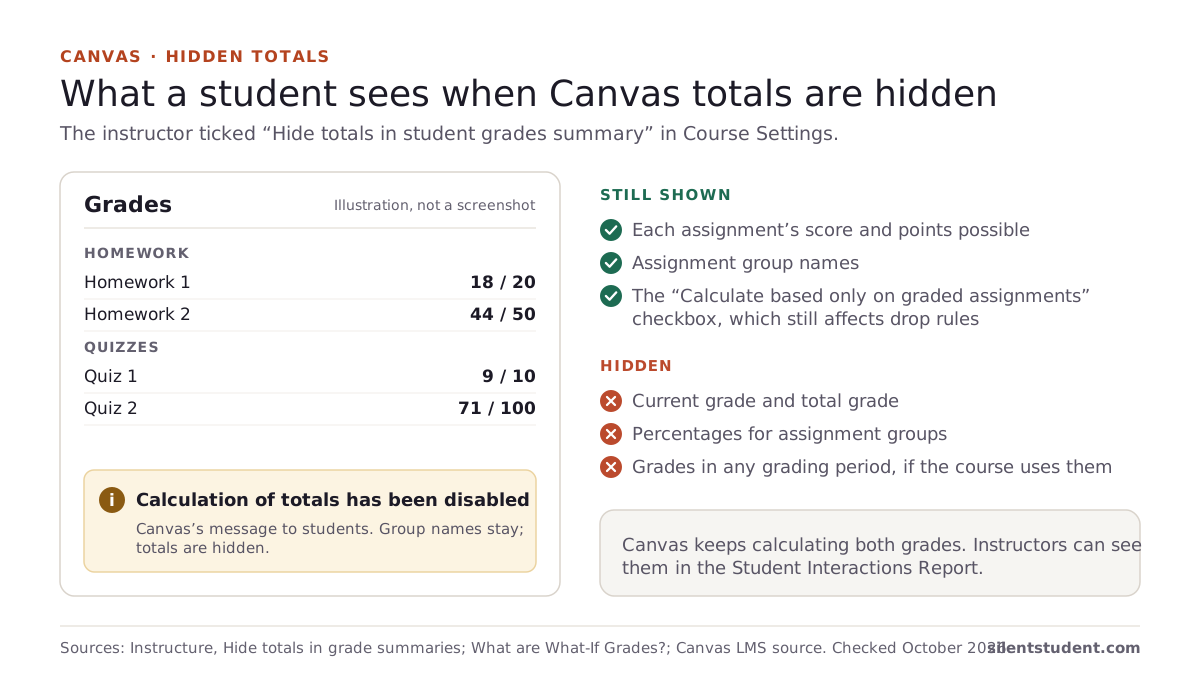
It means the course is set to hide totals from students. Instructure’s instructor guide says “In Course Settings, instructors have the option to hide total grades from students.” The instructor opens Settings, then the Course Details tab, selects “Hide totals in student grades summary” and clicks Update Course Details. From then on, students who open the Grades page in that course see the message.
It is a setting for the whole course. Instructure doesn’t say why an instructor would choose it, and we won’t guess.
In the Canvas apps the sign is different. Instructure says that in the Android and iOS apps, “when a student enables Show Grades, a lock icon displays on the course card in the Dashboard when grade totals are hidden.”
What can you still see when totals are hidden?
Your scores, item by item. Hiding totals only takes away the summary numbers:
| On the Grades page | With totals hidden |
|---|---|
| Each assignment’s score, due date and status | Still shown |
| Assignment group names | Still shown (“Assignment group names are displayed”) |
| Group percentages | Hidden |
| Current grade and total grade | Hidden: students “cannot view their current grade or any percentages in assignment groups” |
| The “Calculate based only on graded assignments” checkbox | Still there, and it “still affects individual assignments, such as if an assignment group contains a drop rule” |
| Grades by grading period, if the course uses them | Hidden: the setting “restricts students from viewing grades in any grading period” |
The checkbox row is worth knowing. Instructure says that even with totals restricted, “you may be able to see small changes with assignment shading indicating that a grade may be dropped from the course.” Gray text on an assignment means it was dropped by a group rule and “does not factor into your total score.”
What else can hide a grade in Canvas?
Several settings look alike from the student side. This table matches what you see to its likely cause, using Instructure’s guides:
| What you see | Likely reason | Who sets it |
|---|---|---|
| A note that totals are disabled; group names but no percentages | “Hide totals in student grades summary” is on | Your instructor |
| No total in a course split into grading periods | Students can’t view total grades in a course with grading periods | Course or school settings |
| Letter grades and comments, no numbers | Your school shows only “qualitative data, such as letter grades and grading comments” | Your school |
| A Visibility icon on one assignment | “Score is hidden while instructor is grading”; you won’t see the grade, comments or quiz responses until grades are posted | Your instructor |
| A rubric with no total | “The total rubric score may be restricted by your instructor” | Your instructor |
| A black warning icon on an assignment | Its points “will not count toward your final grade” | Your instructor |
| A dash after you submitted an external-tool assignment | “Some external tool assignments may display a dash instead of a submission icon” | The tool and Canvas |
If only one assignment is missing a score, the Visibility icon or an external tool is the likelier cause. If the whole course has no total, it is usually the hide-totals setting. For a single quiz, see why a Canvas quiz score is not showing.
Can your instructor still see your total?
Yes. Instructure’s overview of What-If grades says “Canvas is always calculating two grades for students: the current grade (based on graded assignments) and the total grade (based on all assignments),” and that instructors “can view current and total scores for students by viewing the Student Interactions Report.” Its gradebook overview lists “Automatically calculate total and final grades” among the gradebook’s jobs. Hiding totals only changes what you are shown.
Can you use What-If scores when totals are hidden?
Not to see a total. Instructure says that if an instructor “has hidden student grade totals in Course Settings, students cannot view their current or total grade in the student Grades page.” The guides we read don’t say whether the What-If boxes stay usable in that case, but with no total on the page there is nothing for a What-If to update. Our guide to Canvas What-If grades covers what What-If does when totals are visible.
How can you work out your grade when the total is hidden?
From the pieces you can still see, plus your syllabus:
- Copy each score and its points possible from the Grades page, grouped by assignment group.
- Find the group weights. They are usually in your syllabus. Instructure says weights “will show up in the Gradebook for both students and instructors,” but the guides we read don’t say whether they still show when totals are hidden.
- If the course is weighted, follow Instructure’s rule: points earned ÷ points possible in each group, times its weight, then add the groups. Groups with nothing graded drop out and the rest are divided by their combined weight.
- If it isn’t weighted, add every point earned and divide by every point possible.
A short made-up example of step 4: scores of 18/20, 44/50, 9/10 and 71/100 add up to 142 of 180 points, or 78.89%. Drop rules, excused work and weights make the arithmetic longer, which is what our free Canvas grade calculator is for. It runs in your browser, so the scores you type aren’t sent anywhere. If the number matters, for a scholarship or a prerequisite, ask your instructor for your current grade; they can see it.
Where Silent Student fits
We make Silent Student, a desktop app for Mac and Windows from El Dorado Ignition LLC that works Canvas quizzes, essays, discussion posts and file uploads in due-date order, with written work held for your approval. It doesn’t take proctored or LockDown Browser quizzes.
It can’t reveal a hidden total. It signs in as you, so a total your instructor hides from you is hidden from it as well. Plans are $11.99, $24.99 or $49.99 a month, with no free plan; the grade calculators are free. Instructure’s Acceptable Use Policy and your school’s academic-integrity policy still apply.
More: Silent Student on Canvas.
Questions people ask
Why can’t I see my total grade in Canvas?
Usually your instructor turned on “Hide totals in student grades summary” in Course Settings. Your school can also limit grades to letters only, and courses with grading periods can hide totals for those periods.
What does “calculation of totals has been disabled” mean?
It is the message Canvas shows when totals are hidden for the course. Assignment group names still appear, but the current grade, total grade and group percentages do not.
Can my instructor still see my total grade in Canvas?
Yes. Instructure says Canvas always calculates a current and a total grade, and instructors can see both, for example in the Student Interactions Report.
Why is there a lock on my course card in the Canvas app?
Instructure says that in the Android and iOS apps, when a student turns on Show Grades, a lock icon appears on the course card when grade totals are hidden.
Can I use What-If scores when my Canvas total is hidden?
Not to see a total. When your instructor has hidden totals, Instructure says students cannot view their current or total grade, so there is nothing for a What-If score to update.
How do I calculate my Canvas grade if the total is hidden?
Use your scores from the Grades page and the group weights from your syllabus: work out each group’s percentage, multiply by its weight and add them up, or enter the scores in a Canvas grade calculator.
Sources
All fetched and checked October 20, 2026 unless a line says otherwise.
- How do I hide totals in my students’ grade summaries? (Instructure, instructor guide)
- What are What-If Grades? (Instructure)
- How do I view my grades in a current course? (Instructure, student guide)
- How do I use the icons and colors in the Grades page? (Instructure, student guide)
- How do I approximate my assignment scores using the What-If Grades feature? (Instructure, student guide)
- How do I weight the final course grade based on assignment groups? (Instructure, instructor guide)
- What are Grades and the Gradebook? (Instructure)
How this guide was made. We read each Instructure guide listed above on October 20, 2026 and quote them directly. The table of other reasons groups Instructure’s statements by what a student sees; the points example is made up. We wrote the guide with AI assistance and checked each quote against its source.
Related guides: How do What-If grades work in Canvas? · What happens when a Canvas quiz time limit runs out? · All guides · Canvas · Canvas grade calculator
Written by the company that makes Silent Student. Silent Student is not affiliated with or endorsed by Instructure. Canvas and Instructure are trademarks of Instructure, Inc.