How do you enter a What-If score in Canvas?
From the Grades page in a web browser. Instructure’s student guide lists the steps:
- In Course Navigation, click Grades.
- If your course uses grading periods, pick one from the Grading Period menu and click Apply.
- Find the assignment and click its score cell.
- Type a hypothetical score. “The Grades page updates the total score with the What-If grade.”
- To undo it, click Revert to Actual Score.
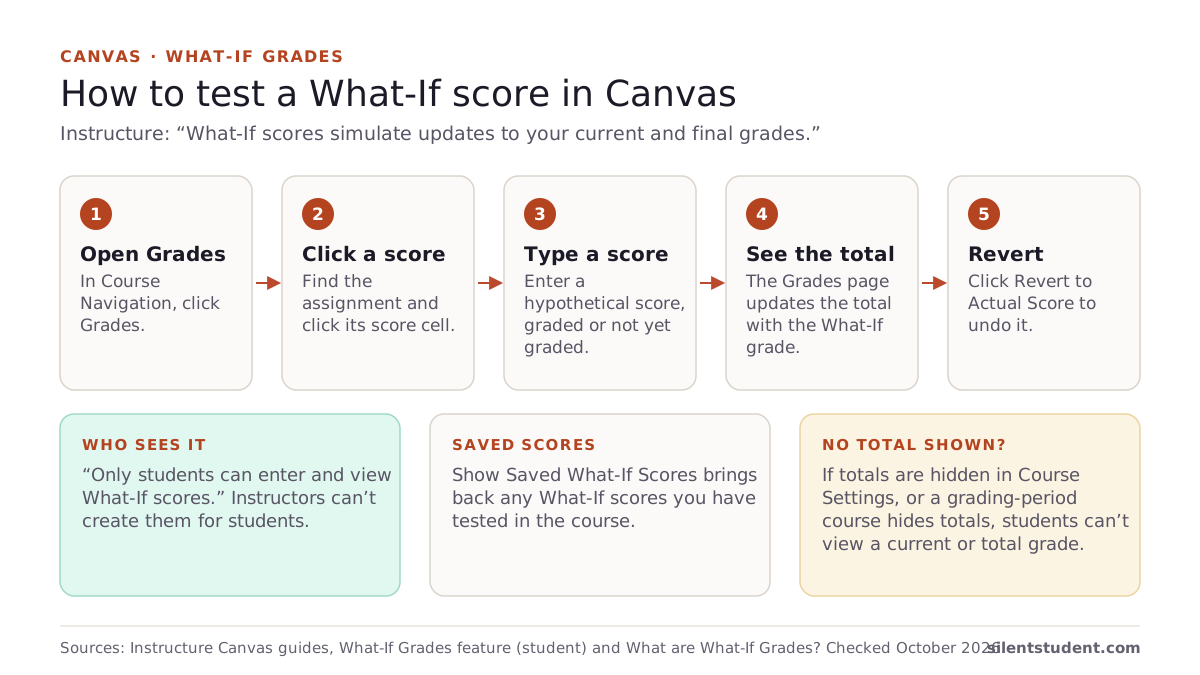
It works on work that already has a score and on work that doesn’t. Instructure says you can test “an assignment that already includes a score, or an assignment that has yet to be graded,” for example to see what a resubmission would do. The Show Saved What-If Scores button brings back “any What-If scores you’ve ever tested in your course.”
Can your teacher see your What-If grades?
No. Instructure’s overview says “Only students can enter and view What-If scores,” and “Instructors cannot create hypothetical scores for students using What-If scores.” Your instructor sees your real scores, plus your current and total grade in the Student Interactions Report. In our reading, a What-If is a calculation on your own Grades page: the Revert button returns you to the “actual score,” and nothing in Instructure’s guides says a What-If reaches the gradebook.
Should “Calculate based only on graded assignments” be ticked?
It depends on the question you are asking. Instructure says Canvas “is always calculating two grades for students: the current grade (based on graded assignments) and the total grade (based on all assignments).” The box is ticked by default, which shows the current grade. Untick it to see the total, where ungraded work counts as zero.
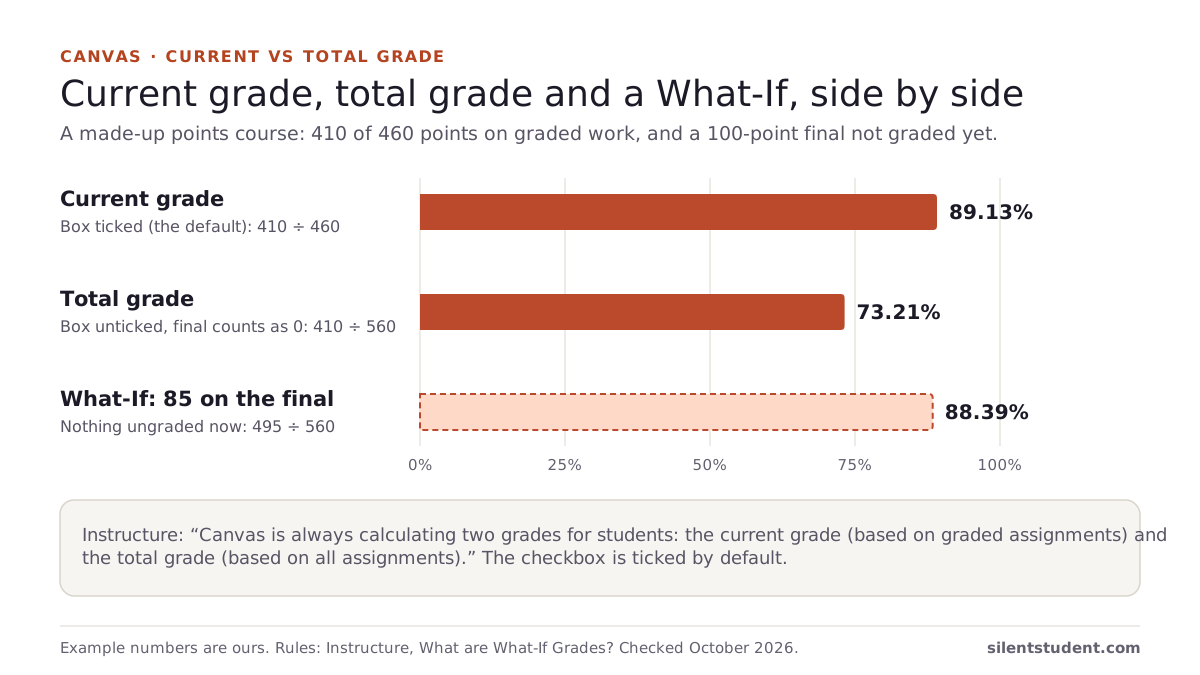
A made-up points-based course shows the difference. You have 410 of 460 points on graded work, and a 100-point final is not graded yet:
| View | Calculation | Grade |
|---|---|---|
| Current (box ticked) | 410 ÷ 460 | 89.13% |
| Total (box unticked) | 410 ÷ 560, the final counted as 0 | 73.21% |
| What-If 85 on the final | 495 ÷ 560 | 88.39% |
Once the final has a What-If score, nothing is ungraded, so the current and total views agree. Use the total view when you want to see the worst case if work stays missing, and a What-If when you want to test a score you expect.
How do What-If scores work with weighted assignment groups?
Canvas weights groups, not single assignments. Instructure’s guide says each group’s percentage is the points earned divided by the points possible in that group, multiplied by the group’s weight, and the results are added. A group with nothing graded is left out, and the rest are “divided by their combined weight.” That rule is why one What-If can move your grade a lot. Another made-up course:
| Group (weight) | Now | With a What-If exam score |
|---|---|---|
| Homework (30%) | 92% | 92% |
| Participation (20%) | 100% | 100% |
| Exams (50%) | Nothing graded, so left out | 78% (What-If) |
| Course grade | (0.92 × 30 + 1.00 × 20) ÷ 50 = 95.2% | 0.92 × 30 + 1.00 × 20 + 0.78 × 50 = 86.6% |
The 95.2% looks safe only because exams don’t count yet. A What-If on the first exam shows what the grade looks like once they do. For drop-lowest rules, excused work and working backward from a target, our free Canvas grade calculator applies the same rules, and the final grade calculator answers “what do I need on the final?”
Why aren’t What-If grades working?
Usually a course or school setting is the cause. The cases Instructure documents:
- Your instructor hid totals. “If an instructor has hidden total grades in Course Settings, students cannot view their current grade or any percentages in assignment groups.” Even if you can type a What-If, there is no total for it to change. Our guide on why a Canvas total is hidden covers this case.
- Grading periods without a total. Instructure says students cannot view their current or total grade “if Multiple Grading Periods are enabled in your course and users cannot view total grades.”
- Your school shows letter grades only. “If enabled by your institution, you may only have the ability to view qualitative data, such as letter grades and grading comments.”
- You are in the app. See the next section.
Can you use What-If grades in the Canvas app on iPhone or Android?
Instructure’s student guide documents What-If on the Grades page in a browser. For the apps, we read Instructure’s open-source code on GitHub on October 20, 2026:
- Android: the Canvas Student app has a “Show What-If Score” checkbox on a course’s grades screen. Instructure’s own end-to-end test checks that it is displayed, starts unchecked, and accepts a What-If grade.
- iPhone and iPad: the iOS app has a “Show What-if Score” toggle, but the code only shows it when an experimental feature called
what_if_scoreis on. Instructure’s code describes such flags as a way to ship code “that is not ready for all users to exercise.” The toggles also appear only when the app has a total grade to show.
So if you don’t see What-If on your iPhone, that is expected from the code we read. Open the Grades page in Safari or another browser instead. App code changes with each release, so treat this as a snapshot from October 2026.
Where Silent Student fits
We make Silent Student, a desktop app for Mac and Windows from El Dorado Ignition LLC. It signs in to your Canvas in its own browser and works quizzes, essays, discussion posts and file uploads in due-date order. Essays, discussions and uploads are drafted and held for your approval, and it does not take proctored or LockDown Browser quizzes.
It signs in as you, so it sees the same Grades page you do: a total hidden from you is hidden from it too. Plans are $11.99, $24.99 or $49.99 a month, with no free plan. The grade calculators linked above are free and don’t need an account. Instructure’s Acceptable Use Policy and your school’s academic-integrity policy still apply.
More: Silent Student on Canvas.
Questions people ask
Can my teacher see my What-If grades in Canvas?
No. Instructure says only students can enter and view What-If scores, and instructors cannot create them for students.
Do What-If scores change my real Canvas grade?
No. They simulate your current and final grades on your own Grades page. Revert to Actual Score puts the real score back.
Why can’t I find What-If on the Canvas app on my iPhone?
In the iOS app code we read in October 2026, the Show What-if Score toggle sits behind an experimental feature flag, so you may not see it. Use the Grades page in a web browser.
Why does my What-If score not change my total?
Most likely your instructor has hidden totals, or your course uses grading periods without a visible total. Instructure says students then cannot view their current or total grade.
What is the difference between current and total grade in Canvas?
The current grade counts only graded work. The total grade counts every assignment, so ungraded work counts as zero. Untick “Calculate based only on graded assignments” to see the total.
Are Canvas What-If scores saved?
Yes. Instructure says Show Saved What-If Scores brings back any What-If scores you have ever tested in the course.
Sources
All fetched and checked October 20, 2026 unless a line says otherwise.
- How do I approximate my assignment scores using the What-If Grades feature? (Instructure, student guide)
- What are What-If Grades? (Instructure)
- How do I view my grades in a current course? (Instructure, student guide)
- How do I weight the final course grade based on assignment groups? (Instructure, instructor guide)
- How do I hide totals in my students’ grade summaries? (Instructure, instructor guide)
- Canvas Android, GradesE2ETest.kt (Instructure on GitHub, master branch)
- Canvas iOS, GradeListTogglesView.swift (Instructure on GitHub, master branch)
- Canvas iOS, GradeListInteractor.swift (Instructure on GitHub, master branch)
- Canvas iOS, ExperimentalFeature.swift (Instructure on GitHub, master branch)
How this guide was made. We read each Instructure guide listed above on October 20, 2026 and quote them directly, and we read the listed files in Instructure’s public Android and iOS repositories the same day. Both worked examples are made-up courses calculated with Instructure’s published rules. We wrote the guide with AI assistance and checked each quote against its source.
Related guides: Why is my Canvas total grade hidden? · What happens when a Canvas quiz time limit runs out? · All guides · Canvas · Canvas grade calculator
Written by the company that makes Silent Student. Silent Student is not affiliated with or endorsed by Instructure. Canvas and Instructure are trademarks of Instructure, Inc.