What kinds of workspaces does MATHia have?
Two. Carnegie Learning’s reports FAQ says: “There are two types of workspaces in MATHia: Mastery and Concept Builders.” They look alike on screen but end in different ways.
| Concept Builder | Mastery | |
|---|---|---|
| What you do | “Explore tools, animations, classification tools, and worked examples” | Problems where “each step in a problem aligns with one or more skills” |
| How many problems | “A fixed number” | “An indefinite number,” up to a maximum |
| How it ends | You finish every problem: the workspace is Completed | Every skill mastered (Mastered), or the problem limit reached first (Not Mastered) |
| What the progress rings show | Which problem and step you are on, and how many are left | “MATHia’s estimate of the student’s knowledge of each skill” |
| Performance Score | Your hints, errors and time compared with “historical data from this workspace” | “The student’s percentage of skills proficient in that workspace” |
| Step-by-Step example | “Not… in most workspaces” | “In some workspaces” you start with one (student guide) |
Carnegie Learning sums up the naming: “A student completes a Concept Builder workspace and masters a Mastery workspace.” Concept Builders are meant to “prepare them for the Mastery workspaces that follow.” In both, MATHia records “the number of errors students make, the number of hints they ask for, and the amount of time spent in the workspace.”
Why does a MATHia workspace keep giving me problems?
Because it is a Mastery workspace and at least one skill isn’t at mastery yet. Carnegie Learning says that to finish one, “students must work through an indefinite number of problems until they have shown mastery of all the skills in the workspace.” A skill turns green when MATHia estimates you have mastered it. In our reading, one skill that keeps slipping is enough to keep the workspace going, even if the others are green, until you either master it or hit the workspace’s problem limit.
The skill bars can also fall. Carnegie Learning says a skill “can go down, however, when students make a mistake or ask for the answer,” and that the bars then show your current estimate alongside your “personal best.”
What makes a MATHia skill go up or down?
MATHia’s Skillometer shows an estimate. Carnegie Learning says “Each skill value is an estimate of how likely you know that skill (e.g., it’s not a percent correct).” Some skills move fast: it gives “Enter given” as one that “zooms to near mastery in one or two attempts,” while finding a hypotenuse from the longer leg of a 30°-60°-90° triangle is a skill that is “going to take several attempts” to master.
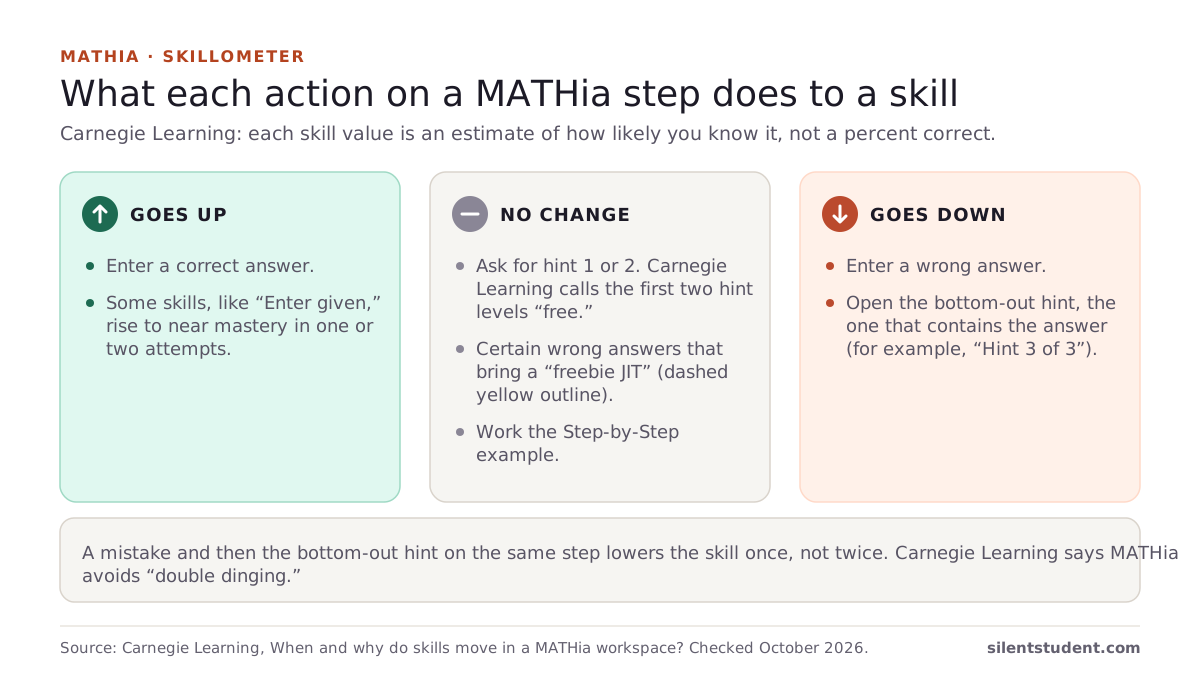
| On one step, you… | Effect on the skill |
|---|---|
| Enter the right answer | Goes up |
| Ask for hint 1 or 2 | No change: “the first two hint levels are ‘free.’” |
| Enter a wrong answer | Goes down |
| Enter a wrong answer that brings a “freebie JIT” (dashed yellow outline) | No change: these mistakes “do not have any skill implications” |
| Open the bottom-out hint (it contains the answer, highlighted in yellow, e.g. “Hint 3 of 3”) | Goes down |
| Make a mistake, then open the bottom-out hint on that same step | Goes down once, not twice: MATHia avoids “double dinging” |
| Work the Step-by-Step example | No change: it “does not impact a student’s skill level” |
Carnegie Learning’s own one-line advice: “Try to complete each step by yourself. If you can’t (or you make a mistake), then you should ask for a hint.”
What does Not Mastered mean in MATHia?
That you reached the workspace’s problem limit before every skill reached mastery, and MATHia moved you on. The Performance Score then shows how far you got: in Mastery workspaces it “represents the student’s percentage of skills proficient in that workspace,” on a 0 to 100 scale. Carnegie Learning adds that “any score below 100 indicates that the student has not fully mastered the workspace,” even when most skills were mastered.
Can you redo a MATHia workspace?
Your teacher can send you back. Carnegie Learning’s teacher article uses the Change Placement option in Teacher’s Toolkit to re-assign a workspace. Its notes: “The student’s original workspace performance will remain on their Student Detail Report,” a redo adds “a second entry,” and afterwards the student returns to “the next incomplete workspace in the module they are currently assigned.” The support pages we read describe this from the teacher side only, so ask your teacher.
How do you enter answers in MATHia?
Carnegie Learning’s getting-started page for students covers the input rules that trip people up:
- Use an asterisk (*) for multiplication and a forward slash (/) for division.
- Type 1/2 for a fraction, or use the Expression Editor; for a mixed number like 3 1/2, “put a space between the 3 and the 1/2.”
- “Decimal answers should be accurate to the hundredths place, unless the problem says otherwise.”
- “For most questions, you can enter any calculation that is equal to the correct answer.”
- Right-click an answer box (or press and hold on a touch screen) to see your Answer History.
Where Silent Student fits
We make Silent Student, a desktop app for Mac and Windows from El Dorado Ignition LLC. It opens MATHia from a link in your Canvas course and enters each step with its general vision agent, reading MATHia’s check before the next one. There is no MATHia-specific solver and no published MATHia run.
- Both workspace types open the same way. Concept Builders lean on explore tools and animations, which are its weakest type, so Mastery workspaces made of typed steps usually go further. Graphing and drawing steps are the hardest.
- Mastery is MATHia’s call. A workspace can end Not Mastered at its problem cap, and the agent’s wrong steps lower skills just as yours do. Its steps, errors and time count as yours, and it does not fake or hide any of them.
- If your school reaches MATHia only through a separate login with no Canvas link, there is no link for it to follow.
- Plans are $11.99, $24.99 or $49.99 a month, with no free plan. Your school’s academic-integrity policy applies.
More: MATHia help: what Silent Student does. If MATHia is one category in your class grade, the weighted grade calculator shows what it does to the total.
Questions people ask
How many kinds of workspaces does MATHia have?
Two: Concept Builder and Mastery. A Concept Builder has a fixed number of problems you must all complete. A Mastery workspace adapts and ends when you master every skill or reach its problem limit.
Why won’t my MATHia workspace end?
It is a Mastery workspace and not every skill is at mastery yet. Carnegie Learning says students work an indefinite number of problems until they show mastery of all the skills, or until they reach the maximum number of problems.
Do hints lower your skill in MATHia?
Only the bottom-out hint, the one that shows the answer. Carnegie Learning says the first two hint levels are free, and a mistake followed by a bottom-out hint on the same step only counts once.
What does Not Mastered mean in MATHia?
You reached the workspace’s maximum number of problems before mastering every skill, so MATHia moved you on. The Performance Score shows the percentage of skills you were proficient in.
Can I redo a MATHia workspace?
A teacher can re-assign it with Change Placement in Teacher’s Toolkit. Your original result stays on the report and the redo adds a second entry.
Does the Step-by-Step example affect my MATHia skills?
No. Carnegie Learning says the Step-by-Step does not impact a student’s skill level; it teaches the math and the workspace’s interface.
Does Silent Student work in MATHia?
Partly. It enters steps from a Canvas link with its general vision agent and reads MATHia’s check after each one. It has no MATHia-specific solver, graphing steps are its weakest, and it does not promise mastery.
Sources
All fetched and checked October 20, 2026 unless a line says otherwise.
- Understanding Mastery and Concept Builder Workspaces in MATHia (Carnegie Learning)
- What is the difference between a Concept Builder and Mastery workspace? (Carnegie Learning)
- When and why do skills move in a MATHia workspace? (Carnegie Learning)
- What is the Performance Score? (Carnegie Learning)
- What Performance Score is required for “mastery”? (Carnegie Learning)
- What is the difference between Completed and Mastered? (Carnegie Learning)
- How do I have a student redo a workspace they already completed? (Carnegie Learning, for teachers)
- Getting Started: MATHia for Students (Carnegie Learning)
How this guide was made. We read each Carnegie Learning page listed above on October 20, 2026 and quote them directly. The skill table groups Carnegie Learning’s statements by action; the sentence on a single slipping skill is our reading. We wrote the guide with AI assistance and checked each quote against its source.
Related guides: How does the IXL SmartScore work? · How do ALEKS Knowledge Checks work? · Is there a Delta Math answer key? · All guides · MATHia · Weighted grade calculator
Written by the company that makes Silent Student. Silent Student is not affiliated with or endorsed by Carnegie Learning. MATHia and Carnegie Learning are trademarks of their owner.