Is the IXL SmartScore a percentage?
No. IXL’s help center says the SmartScore “is not just based on the percentage of questions correct. It is calculated using many factors, including the number of questions completed, question difficulty, and consistency.” Its guide for teachers and parents lists “questions answered correctly or incorrectly, question difficulty, recent answers, and consistency.”
Every skill starts at 0, and the score moves both ways. IXL’s blog describes the loop: after a correct answer “the following questions will become more difficult,” and after a wrong one the student gets “a step-by-step walkthrough,” the score goes down and “the following questions will become easier.” That is why two students can answer the same number of questions and end on different scores. IXL says plainly that “the number of questions it takes to master a skill varies with every student.”
What do 80, 90 and 100 mean on IXL?
| SmartScore | IXL’s word for it | What changes |
|---|---|---|
| 0 to 70 | “Learning and practicing” | Big gains for right answers, small penalties for wrong ones. |
| 80 | “Proficient” | IXL’s guide calls it a “Great goal” that “could be the perfect stopping point.” |
| 90 | “Excellent” (help center) | You enter the Challenge Zone, where questions are “rigorous.” |
| 100 | “Mastered” | IXL says you may need “as many as 10 questions correctly in a row” to get here from the Challenge Zone. |
The help center puts it in one line: “A score of 80 is proficient, and a score of 90 is considered excellent,” and “A skill is mastered when the SmartScore reaches 100.”
Why does my SmartScore drop so much after 90?
Because the Challenge Zone changes the math on purpose. IXL’s guide says that from 90, “SmartScore increases for correct answers will be small (1-2 points), and penalties for incorrect answers will be larger (3-8 points).” Its blog says the bigger drops give students “more time to explore the topic before they reach mastery.”
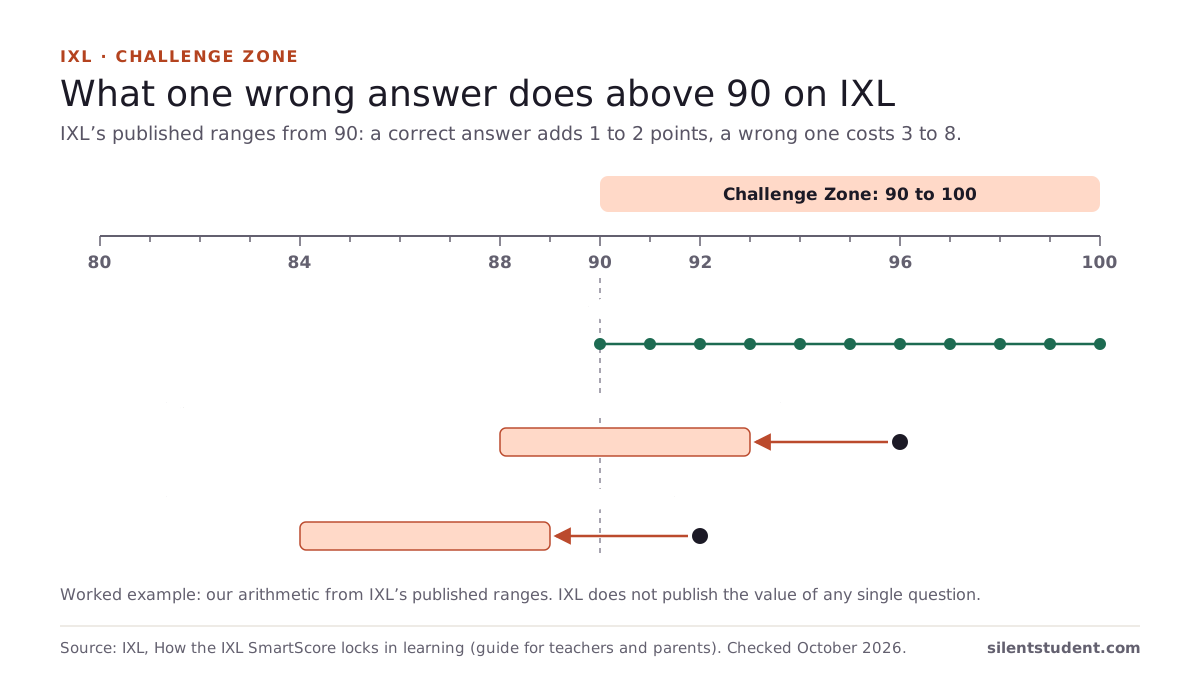
Using only those published ranges, here is what one miss can do. This is our arithmetic, not an IXL table, and IXL does not publish the exact value of any single question.
| Starting score | What happens | Possible new score |
|---|---|---|
| 90 | Ten right answers at +1 each | 100 |
| 90 | Five right answers at +2 each | 100 |
| 96 | One wrong answer (−3 to −8) | 88 to 93 |
| 92 | One wrong answer (−3 to −8) | 84 to 89, back below the Challenge Zone |
So a single miss near the top can undo several right answers, and a miss just above 90 can drop you out of the zone entirely. IXL’s advice for this stage is “Don’t rush!”: check answers and read the explanation after a miss.
Can you still reach 100 after a lot of wrong answers?
Yes, by IXL’s own account. The guide says “no matter how many questions they miss along the way, they always have the chance to reach mastery (100),” and the blog says that even after a drop students “can always continue answering questions and increase their SmartScore.” IXL contrasts that with a percentage score, where “each missed question becomes a permanent deduction.” Its suggested help after a miss is the answer explanation, and then an in-skill recommendation to build the background for harder questions.
Your progress is saved. The blog notes that “Students’ progress in IXL is automatically saved, so they can always take a brain break and come back later.”
Can you reset an IXL SmartScore?
A teacher can. IXL’s blog post on resets (updated March 25, 2024) says a reset “brings student SmartScores back to zero and starts them from the beginning of a skill.” Teachers do it from the Skill Analysis report in the Analytics tab, for one class or the whole roster. Three details from that post:
- “There is no way to undo a SmartScore reset.”
- IXL recommends not resetting when students are struggling, and points to explanations, videos and in-skill recommendations instead.
- Older work is still in most reports if the range is changed to “all time,” except the Trouble Spots report, which clears its data for that skill.
The IXL pages we read describe resets only from the teacher side. If you need a fresh start on a skill, ask your teacher.
Should you stop at 80 or go to 100?
That depends on what your teacher assigned. IXL’s guide says 80 “is considered proficiency in a skill and could be the perfect stopping point,” and cites research that IXL works better “when students reach a SmartScore of 80 in at least two skills per week.” Its blog says 80 or 90 “may be a perfect stopping point, especially when students are learning a new topic,” and suggests 100 can be “an extra credit opportunity.” If your class grades IXL by a target score, the target in the assignment is the one that counts.
Where Silent Student fits
We make Silent Student, a desktop app for Mac and Windows from El Dorado Ignition LLC. On IXL it uses its general vision agent, not a solver written for IXL: it opens skills linked from your Canvas course, enters each answer, presses Submit and reads IXL’s feedback before the next question.
- It can’t promise a SmartScore. In the Challenge Zone each wrong answer costs 3 to 8 points, and the agent can answer wrongly. The run log lists every question it answered.
- It does not take IXL diagnostics, and it cannot run inside IXL SecureTest, which uses Respondus LockDown Browser (which IXL tests use SecureTest). For what a Diagnostic score means, see the IXL Diagnostic score chart.
- We have published no IXL run, so we publish no IXL accuracy figure. Plans are $11.99, $24.99 or $49.99 a month, with no free plan.
IXL’s Terms. IXL’s Terms of Service, last updated September 30, 2026, say: “You will not use, allow, enable, or cause the deployment of an Agent (i.e., any software or service that takes autonomous or semi-autonomous action on behalf of, or at the instruction of, any person or entity) to access, use, or interact with the Service.” In our reading, that reaches Silent Student. We are not lawyers. Your school’s policy applies too.
More: what an IXL answer bot can and can’t do to your SmartScore. Looking for answers instead? Is there an IXL answer key? explains why none matches your questions and what IXL shows after a miss. If your teacher counts IXL as one category of your grade, the weighted grade calculator shows what it does to the total.
Questions people ask
Is the IXL SmartScore a percentage?
No. IXL says it is “not just based on the percentage of questions correct” and is calculated from factors including the number of questions completed, question difficulty and consistency.
What is a good SmartScore on IXL?
IXL calls 80 proficient and a “Great goal,” 90 excellent, and 100 mastery. Its guide says 80 could be the perfect stopping point. Your teacher’s target is the one that counts for your grade.
Why did my IXL SmartScore go down so much?
Above 90 you are in the Challenge Zone, where IXL says a correct answer adds 1 to 2 points and a wrong one takes off 3 to 8. One miss near 100 can cancel several right answers.
How many questions does it take to get 100 on IXL?
It varies by student. IXL says the number of questions it takes to master a skill varies with every student, and that from the Challenge Zone you may need as many as 10 correct answers in a row.
Can a student reset their IXL SmartScore?
The IXL pages we read describe resets by teachers, from the Skill Analysis report. A reset puts the skill back to zero and cannot be undone, so ask your teacher.
What is the IXL Challenge Zone?
The stretch from 90 to 100. IXL says its questions are rigorous and that students must answer them correctly and consistently to reach mastery.
Can Silent Student get my IXL SmartScore to 100?
It can’t promise it. It answers question by question and reads IXL’s feedback, but in the Challenge Zone a wrong answer costs 3 to 8 points and the agent can be wrong.
Sources
All fetched and checked October 20, 2026 unless a line says otherwise.
- IXL Help Center, How does the SmartScore work?
- How the IXL SmartScore locks in learning: a guide for teachers and parents (IXL, PDF)
- IXL SmartScore: The key to mastery-based learning (IXL blog, updated April 22, 2024)
- Resetting SmartScores for teachers (IXL blog, updated March 25, 2024)
- IXL Terms of Service , last updated September 30, 2026
How this guide was made. We read each IXL page listed above on October 20, 2026 and quote them directly. The Challenge Zone table is our arithmetic from IXL’s published point ranges, not IXL’s own example. We wrote the guide with AI assistance and checked each quote against its source.
Related guides: Is there an IXL answer key? · How do ALEKS Knowledge Checks work? · MATHia workspaces explained · All guides · IXL · Weighted grade calculator
Written by the company that makes Silent Student. Silent Student is not affiliated with or endorsed by IXL Learning. IXL and SmartScore are trademarks of their owner.